
If you work in Dynamics 365 long enough, you’ll hear this every week:
“Can you create an order exactly like last month’s… just change the date and quantities?”
And that’s where time disappears—rebuilding Quotes, Orders, Invoices, or even Cases that are basically the same record with a few tweaks. Dynamics is great at tracking history, but clean copy of transactional records isn’t always easy out of the box.
Copy Record Set by MTC fixes that gap. It lets users copy records in one click, so teams move faster, stay consistent, and avoid manual mistakes.
Why this matters?
No real “Save As” for most transactional records
Templates don’t fit every real-world scenario
Manual recreation leads to missed fields, wrong pricing, wrong dates
Service teams waste time rebuilding similar cases
Copy Record Set turns “rebuild it again” into “clone and edit.”
What is Copy Record Set?
Copy Record Set is a Dynamics 365 / CRM add-on that lets you copy records like Quotes, Orders, Invoices, and Cases directly from:
- the form command bar, or
- views (list pages)
You can copy records whether they’re open or closed, and it works for system and custom entities too.
Key features
1) One-click copy (fast adoption)
Select a record → click Copy Record → you get a new record ready to edit.
2) Works on common transactions
Perfect for:
- Quotes
- Orders
- Invoices
- Cases
…and more (including custom entities).
3) Copy from forms and views
Users can copy where they already work—no extra screens.
4) Template-like repeatability
Great for recurring deals, repeat orders, standard bundles, and repeat service scenarios.
5) Extension-friendly
You can add custom enhancements (like triggering workflows/scripts after copy) if needed.
Admin-controlled copy rules (one-time setup)
This is what makes it more than just a basic clone tool.
6) Control which fields get copied
Admins can configure:
- which fields should copy into the new record
- which fields should not copy (so they reset/blank out)
This helps avoid carrying over things like:
- record numbers and identifiers
- statuses / approvals / posting flags
- dates that must be refreshed
- “processed/sent” type indicators
7) Choose whether related records are copied
Admins can also set whether to copy related data, such as:
- Quote lines / Order products / Invoice products
- Notes and attachments
- other related custom relationships based on your setup
So you can support both:
- Header-only copy (shell record)
- Full copy (header + line items + notes)
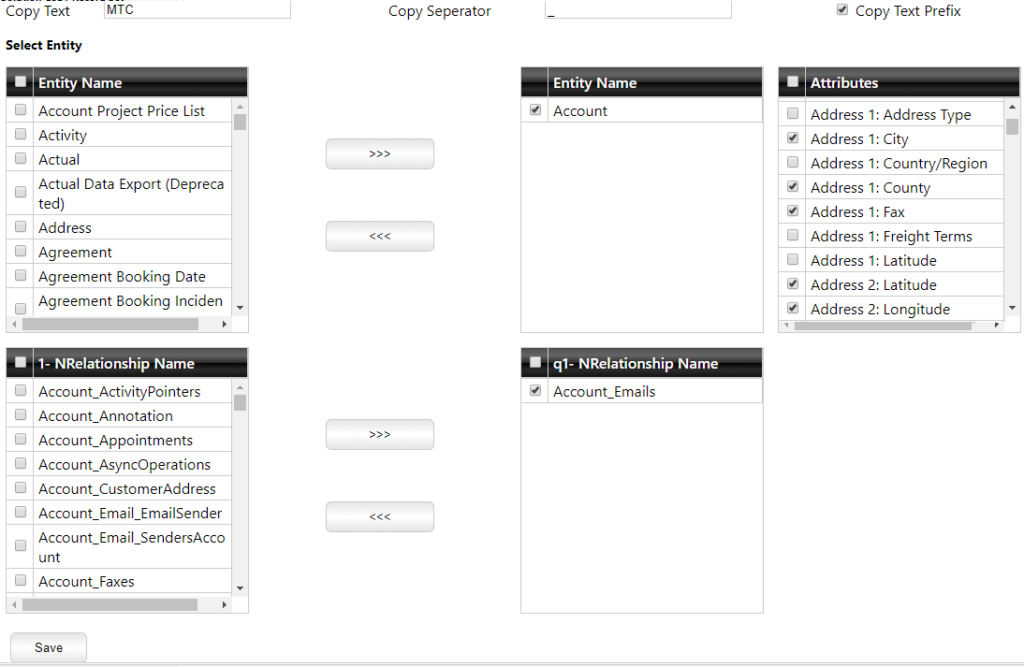
Backend configuration Walkthrough
- Set the copy name format: Enter any text + a separator (e.g., Copy -).
- If Copy text prefix is checked, the text is added as a prefix; otherwise, it’s added as a suffix.
- Select entities: Tick the entities from the left list and move them to the Entity Names (right box).
- You can also move entities back to the left if needed.
- Pick an entity to configure: Select an entity (e.g., Account).
- Its attributes (fields) will appear in the attribute list. You can select attributes to not get copied to the new record.
- Its 1: N relationships will appear in the relationship list.
- Choose related records to copy: Select required 1: N relationships and move them to the right (enabled list).
- Save settings: Click Save at the bottom to apply the configuration.
NOTE:
Attribute rule: Any attributes you select here will NOT be copied to the new record.
Where it pays off
Sales teams
- Re-quote a customer using the last quote as a starting point
- Copy an order for repeat replenishment and adjust quantities/dates
- Reuse standard product bundles without rebuilding line items
Customer service teams
- Copy or clone a case for recurring issues
- Maintain consistency and reduce handling time
Ops/Admin
- Reduce data entry errors
- Standardize how records are created across teams
Pricing (as shared by vendor — confirm latest)
- $499 base price (one-time, no yearly subscription)
- No per-user licensing
- 1st year maintenance included
- 25% annual maintenance for upgrades/support
Final takeaway
Copy Record Set is a simple Dynamics 365 add-on that saves real time. Users get a quick Copy Record button, and admins get the control to decide what should copy, what should reset, and whether related records should come along.