
What Is Power Apps Code-First Development? (And Why It Changes Everything)
Power Apps code-first development — delivered through Power Apps code apps — lets professional developers build enterprise-grade Single-Page Applications (SPAs) using React, Vue, or any JavaScript/TypeScript framework, directly inside Visual Studio Code, and publish them into the secure, governed Microsoft Power Platform ecosystem.
For years, Microsoft Power Apps was the go-to platform for rapid low-code app development. But canvas and model-driven apps have real ceilings: limited custom UI control, performance bottlenecks at scale, and development workflows that don’t fit naturally into modern DevOps pipelines.
Power Apps code apps solve exactly that problem.
With code apps, you write your application entirely in code — using React, Vue, TypeScript, and your preferred IDE — while still publishing and hosting within the managed Microsoft Power Platform environment. You get the freedom and flexibility of modern web development, combined with the governance, security, and connectivity of Power Platform.
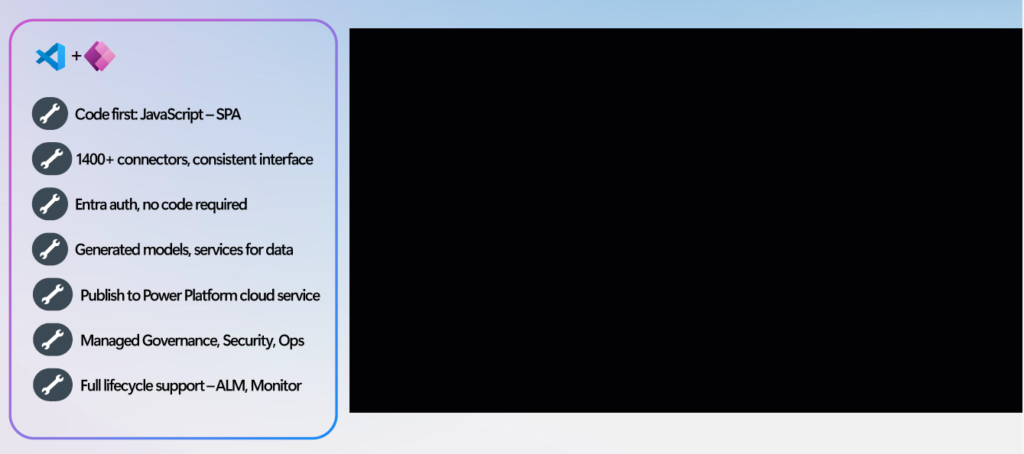
In this two-part series, we cover everything you need to know about Power Apps code-first development. This part walks through what code apps are, why they matter, how they work architecturally, and how to set up your first project. In Part 2, we apply it to a real-world build: a fully functional Property Management System (PMS) built by our MTC team.
The App Development Landscape in 2026
The world of app development now spans a wide spectrum — from prompt-based AI tools (fast, lightweight apps with built-in chat) to AI-assisted full-stack platforms built for professional developers creating enterprise-ready solutions.
Tools such as ChatGPT, Claude, and Replit sit at the prompt-based end. At the professional end you find platforms like GitHub Copilot, Cursor, Supabase, and — firmly positioned here — Microsoft Power Apps code apps.
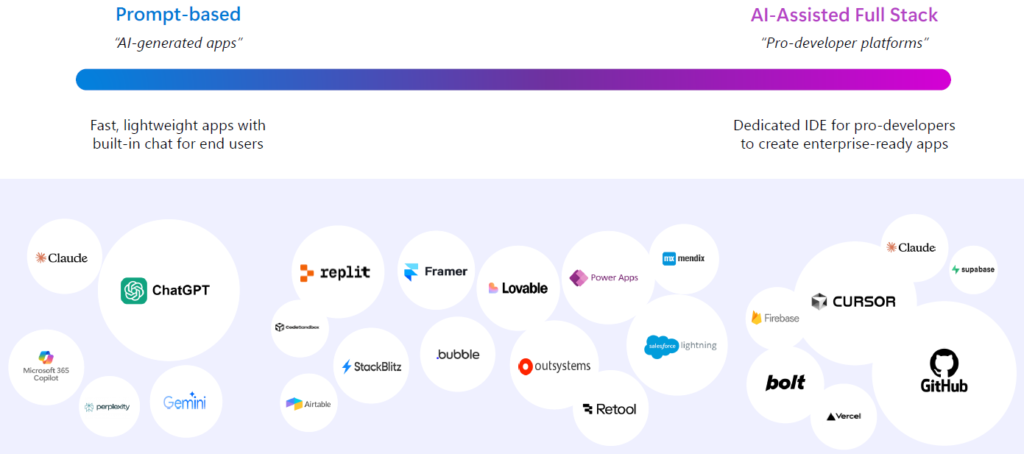
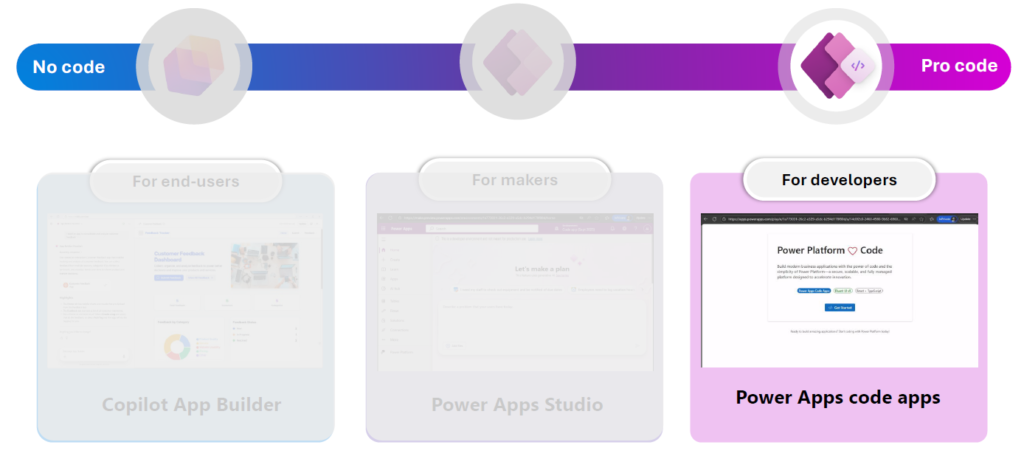
Microsoft Power Platform offers a range of tools across this spectrum:
| Tool | Audience | Approach |
| Copilot App Builder | End-users | No-code, prompt-driven |
| Power Apps Studio | Makers | Low-code, visual designer |
| Power Apps Code Apps | Developers | Pro-code, IDE-based |
What Is a Power Apps Code App?
A Power Apps code app is a Single-Page Application (SPA) built in a developer IDE — such as Visual Studio Code — using JavaScript or TypeScript. Unlike canvas apps, which are built through a visual drag-and-drop studio, code apps are written entirely in code, giving developers full control over UI and application logic.
Here is what makes Power Apps code apps stand out:
- Code-first freedom: Build SPAs using React, Vue, or any JavaScript/TypeScript framework of your choice.
- 1,400+ connectors out of the box: Access the full Power Platform connector library from your code using auto-generated, strongly-typed models and services.
- Microsoft Entra authentication — zero code required: No App Registration co-ordination with IT needed.
- Auto-generated models and services: The Power Apps CLI reads your connector configuration and generates typed data models, eliminating significant boilerplate.
- Publish to Power Platform cloud: Deploy to a fully managed cloud service with built-in reliability, resilience, and global CDN.
- Managed governance, security, and operations: Inherits the full Power Platform Managed Platform — DLP policies, Conditional Access, app inventory, sharing limits, and Monitor.
- Full ALM lifecycle support: Ship via Power Platform Pipelines, integrate with Azure DevOps or GitHub Actions, and track app health in Monitor.
Who Should Use Power Apps Code Apps?
Who Should Use Power Apps Code Apps?
Power Apps code-first development is the right choice for:
| Audience | Why It Fits |
| Professional Developers | Familiar tooling (VS Code, npm, Git), modern frameworks (React, Vue), no low-code constraints |
| IT Teams | Same managed governance, security, and compliance as canvas apps — no shadow IT |
| ISVs and Technology Partners | Scalable, customisable, client-ready solutions built on a governed enterprise platform |
| Organisations with Complex Requirements | Fine-grained UI control, custom visualisations, and performance beyond what canvas apps allow |
Key Benefits of Power Apps Code-First Development
1. Developer-Friendly Tooling
1. Developer-Friendly Tooling
With Power Apps code-first development, you work entirely in Visual Studio Code (or your preferred IDE), using npm, Git, and the Power Apps CLI — tools that are second nature to any modern developer. No fighting a proprietary low-code studio to achieve what is trivial in code.
2. Connect to 1,400+ Data Sources Directly from JavaScript
One of the most powerful aspects of code apps is calling Power Platform connectors directly from JavaScript or TypeScript. This means connecting to Microsoft Dataverse, SharePoint, Azure services, and hundreds of third-party platforms without writing complex API integration code from scratch.
Important: Not all connectors are available for code apps yet. Verify that your required connectors are supported before starting your project — check the official connector documentation.
3. Enterprise-Grade Security Out of the Box
Power Apps code apps inherit the full Power Platform security model:
- Microsoft Entra authentication and authorisation
- Role-based access control
- Conditional Access policies
- Data Loss Prevention (DLP) enforcement
- Tenant isolation and Azure B2B support for external users
4. Simplified Deployment and Application Lifecycle Management (ALM)
Publishing a Power Apps code app is as simple as running a CLI command. Your app is deployed to Power Platform and immediately benefits from the same ALM tooling as any other Power Platform solution — solution packages, environment management, and deployment pipelines included.
5. Future-Proof, Portable Architecture
Building with React, Vue, and TypeScript means your codebase is portable, maintainable, and backed by a vast global developer community. You are not locked into proprietary tooling.
Power Apps Code Apps vs Azure PaaS: Which Is Faster for Enterprise Apps?
A common question from developers is: “Why not deploy a React app to Azure Static Web Apps or App Service?” You absolutely can — but replicating what Power Platform provides out of the box requires significant engineering effort. Here is the direct comparison:
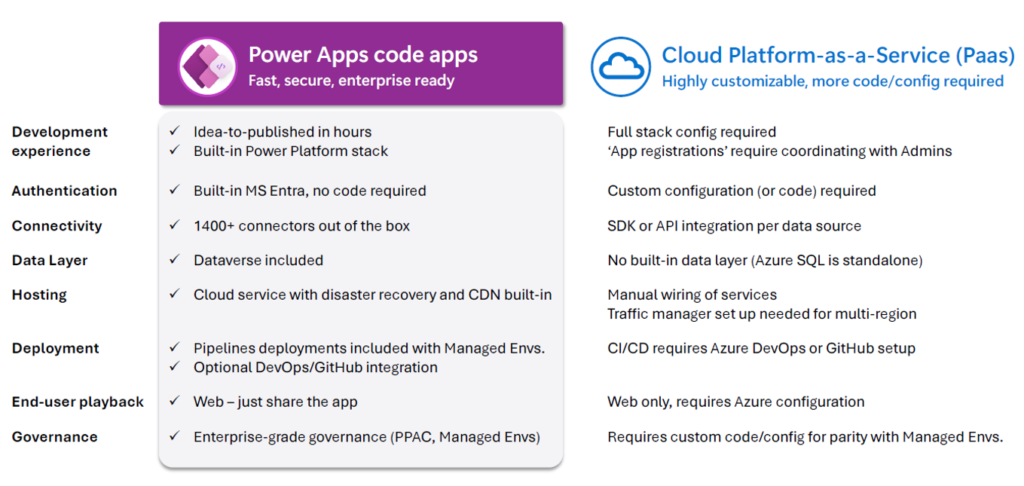
| Capability | Power Apps Code Apps | Azure / Cloud PaaS |
| Development experience | Idea-to-published in hours; built-in Power Platform stack | Full stack configuration required; App Registrations need IT co-ordination |
| Authentication | Built-in MS Entra — zero code required | Custom configuration or code required |
| Connectivity | 1,400+ connectors out of the box | SDK or API integration per data source |
| Data layer | Dataverse included | No built-in data layer (Azure SQL is standalone) |
| Hosting | Cloud service with disaster recovery and CDN built-in | Manual wiring of services; traffic manager setup required for multi-region |
| Deployment | Pipelines included with Managed Environments; optional DevOps/GitHub integration | CI/CD requires Azure DevOps or GitHub setup |
| End-user access | Web — just share the app | Web only; requires Azure configuration |
| Governance | Enterprise-grade PPAC and Managed Environments | Requires custom code and config for parity |
The verdict: Power Apps code apps are the fastest path to an enterprise line-of-business app for organisations already on the Microsoft stack. Cloud PaaS gives you maximum flexibility — but you pay for that with time, expertise, and ongoing operational overhead.
How Do Power Apps Code Apps Work? (Architecture Explained)
Understanding the underlying architecture helps you make better design decisions and debug issues faster. There are two phases: development and runtime.
Development Phase: Your App + the Power Apps SDK
When building, a Power Apps code app project consists of three components:
- Your code — a TypeScript/JavaScript SPA (React or Vue components, pages, and business logic)
- The Power Apps CLI (pac) — scaffolds the project, creates a power.config.json file, and generates strongly-typed models and services for every connector you add
- The Power Apps SDK — imported into your project; handles local communication with Power Platform services so your app works during npm run start

The power.config.json file is the bridge between your code and Power Platform. The CLI reads it to know which environment and connectors your app uses, and regenerates the typed models every time you add a new connector.
Runtime Phase: The Power Apps Host Sandbox
When a user opens your published app, three runtime components work together:
- Your compiled code — bundled JavaScript deployed to Power Platform storage
- The Power Apps SDK — bundled with your app; communicates securely with the host
- The Power Apps host — the Power Apps web shell managing authentication, app loading, and governance enforcement
Your app runs inside a sandboxed iframe within the Power Apps host, protected by a two-layer Content Security Policy (CSP):
- Host-level CSP — prevents undesired embedding; your app runs from apps.powerapps.com
- iframe-level CSP — blocks rogue network calls and insecure JavaScript patterns, protecting against data exfiltration
Admins can configure CSP to be more or less permissive depending on organisational security requirements.

Power Platform Managed Platform: Enterprise Governance at Scale
One of the strongest reasons to choose Power Apps code apps over a DIY cloud deployment is the Power Platform Managed Platform — the same governance, operations, and security layer that manages all other Power Apps.
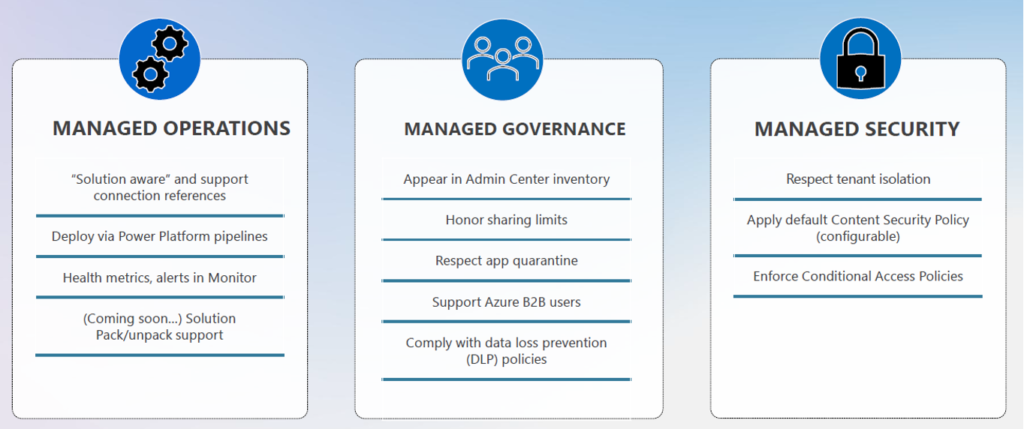
Managed Operations
- “Solution aware” — package and deploy via Power Platform solutions
- Pipeline deployments included with Managed Environments
- Health metrics and alerts in Monitor
- Coming soon: Solution Pack/Unpack support for source control
Managed Governance
- Appear in Admin Centre inventory alongside all other apps
- Honour sharing limits and app quarantine settings
- Support Azure B2B users for external access
- Comply with Data Loss Prevention (DLP) policies
Managed Security
- Respect tenant isolation
- Apply default Content Security Policy (configurable by admin)
- Enforce Conditional Access Policies
Managed Governance
- Appear in Admin Centre inventory alongside all other apps
- Honour sharing limits and app quarantine settings
- Support Azure B2B users for external access
- Comply with Data Loss Prevention (DLP) policies
Managed Security
- Respect tenant isolation
- Apply default Content Security Policy (configurable by admin)
- Enforce Conditional Access Policies
Your IT team gets the same visibility and control over a code app as they do over any canvas or model-driven app — with no shadow IT, no bespoke security reviews, and no custom governance code to write.
Real-World Case Study: Global Engineering Technology and the FAST Framework
The best validation of any technology is whether it holds up in production, a global engineering and technology company, found that traditional Power Apps hit real limits for their complex engineering applications — and chose code apps to break through.

Why Traditional Power Apps Hit Limits
Pain Point Detail UX & Domain Complexity Large unit-of-measure calculations and process flow visualisations required PCF controls, adding significant ALM overhead Performance & Scale No custom components inside Galleries; slow PCF updates; poor performance when embedding Canvas apps in Model-Driven Apps across many records Developer Experience & ALM Git code reviews on app artifacts were developer-unfriendly; reuse at scale was cumbersome; no proper unit testing of client logic
The FAST Framework: Why They Chose Code App
| Pain Point | Detail |
| UX & Domain Complexity | Large unit-of-measure calculations and process flow visualisations required PCF controls, adding significant ALM overhead |
| Performance & Scale | No custom components inside Galleries; slow PCF updates; poor performance when embedding Canvas apps in Model-Driven Apps across many records |
| Developer Experience & ALM | Git code reviews on app artifacts were developer-unfriendly; reuse at scale was cumbersome; no proper unit testing of client logic |
The FAST Framework: Why They Chose Code App
Global Engineering Technology describe their shift to code apps using the acronym FAST:
- F — Faster performance: Full control of data loading and client-side caching; built-in security, connectors, and Dataverse from day one
- A — Agility: Reusable React components shared across apps; direct use of React visualisation libraries without wrapping in PCF
- S — Speed of delivery: A new app built in approximately 120 hours versus over 18 months using their previous approach; GitHub Copilot enabled a Chemical Engineer (not a professional developer) to independently build complex apps
- T — Testing: Real unit and automated testing; proper PR code reviews; full browser developer console access for debugging
Key takeaway: A domain expert with no formal software engineering background built a production-grade hydraulics calculation app using Power Apps code apps and GitHub Copilot. That is the promise of combining enterprise scaffolding with modern AI-assisted development tools.
Prerequisites: What You Need to Build a Power Apps Code App
Before building your first Power Apps code app, ensure the following are in place:
Developer Tools
- Visual Studio Code (or your preferred IDE)
- Node.js (LTS version recommended)
- Power Apps CLI — or, from v1.0.4 onwards, the npm-based CLI built into the @microsoft/power-apps client library
- Git and npm available on the command line
- dotnet runtime
Pro Tip: From Power Apps client library v1.0.4, the new npm-based CLI simplifies setup significantly. The older pac code commands will be deprecated in a future release — transition now to stay ahead.
Platform Requirements
- Power Platform environment with code apps enabled by an administrator
- Power Apps Premium licence for all end-users of the app
How to Set Up Your First Power Apps Code App: Step-by-Step
Step 1: Install Developer Tools
How to Set Up Your First Power Apps Code App: Step-by-Step
Step 1: Install Developer Tools
Install Visual Studio Code, Node.js, and the Power Apps CLI following the official Microsoft setup guide. Confirm all tools are accessible from your command line before proceeding.
Step 2: Enable Power Apps Code Apps in Power Platform Admin Centre
Only administrators can enable code apps for a given environment:
- Sign in to the Power Platform Admin Centre.
- Navigate to Manage > Environments and select your target environment.
- Go to Settings > Product > Features.
- Locate the Power Apps code apps toggle and switch it On.
- Click Save.
Step 3: Scaffold Your Project with the npm CLI
Create a new code app project in seconds:
npx @microsoft/power-apps create –name MyFirstCodeApp
Choose your preferred framework — React is recommended for beginners, though Vue and other JavaScript frameworks are fully supported. The CLI generates a ready-to-build project structure.
Step 4: Connect to Your Power Platform Environment
During local development, authenticate with your Power Platform environment via the CLI and configure your data sources. The client library provides built-in connectors you can call directly from your JavaScript or TypeScript files.
Step 5: Run and Test Locally
Start the development server to preview your app in the browser:
npm run start
Step 6: Publish to Power Platform
When ready, deploy with a single command:
npm run deploy
Your Power Apps code app will appear in the Power Apps portal, ready to share with users.
Current Limitations of Power Apps Code Apps (April 2026)
Power Apps code apps are generally available and production-ready, but some limitations remain as of April 2026:
| Limitation | Detail |
| No Offline Mode | Code apps require an active internet connection at all times. Canvas apps remain the choice for offline scenarios. |
| Limited Connector Support | Not all Power Platform connectors are available for code apps yet. Verify your required connectors before starting your project. |
| No Mobile App Support | Code apps are not supported in the Power Apps mobile app or Power Apps for Windows (browser only). Mobile support is not expected before mid-2026. |
| No Power Platform Git Integration | Git integration for other Power Platform assets does not yet extend to code apps. |
| No SharePoint Forms Integration | Code apps cannot replace SharePoint form integrations. |
| No Power BI Data Integration | The PowerBIIntegration function is not supported, though code apps can be embedded in Power BI using the Power Apps Visual. |
| Limited $expand Support | OData $expand queries are not yet reliably supported. This is on the Microsoft roadmap. |
Many of these limitations are known gaps on the Microsoft product roadmap, and several are expected to be addressed in upcoming releases.
Is Power Apps Code-First Development Generally Available?
Yes. Power Apps code apps reached General Availability (GA) on 5 February 2026, as announced by the Microsoft Power Platform team. The feature is fully supported for production use across enterprise environments.
Some individual capabilities — including mobile support, FetchXML queries, and $expand — remain under active development. Always check the official Power Apps code apps documentation for the latest capability status before beginning a project.
Frequently Asked Questions
What frameworks does Power Apps code apps support?
What frameworks does Power Apps code apps support?
Power Apps code apps support React, Vue, and any JavaScript or TypeScript framework. React is the most commonly used and recommended for new projects.
Do I need a Power Apps Premium licence for code apps?
Yes. All end-users accessing a published Power Apps code app require a Power Apps Premium licence.
Can I use Power Apps code apps offline?
No. Code apps currently require an active internet connection. Offline support is not on the immediate roadmap and is not expected before mid-2026.
Can I use code apps with Dataverse?
Yes. Dataverse is included as a first-class connector. The Power Apps CLI auto-generates typed models and services for your Dataverse tables.
How is a Power Apps code app different from a canvas app?
A canvas app is built visually in Power Apps Studio using a drag-and-drop designer. A code app is built entirely in code (React, Vue, TypeScript) in your preferred IDE, giving you full control over UI, logic, and performance.
Is Power Apps code-first development suitable for production?
Yes — code apps have been generally available since February 2026 and are fully supported for enterprise production use.
What’s Next: Part 2
Power Apps code-first development represents a genuine shift in how enterprise applications can be built on the Microsoft platform. It removes the ceiling that traditional low-code tools impose, while retaining the governance, connectivity, and security that makes Power Platform so valuable to organisations.
In Part 2, we apply everything covered here to a real-world build. Our MTC team built a fully functional Property Management System (PMS) using React and Power Platform code-first. We walk through the features, architecture decisions, real benefits realised, and the honest challenges we encountered — because understanding the limitations is just as important as knowing the strengths.
Start Building with Power Apps Code Apps
- Read Part 2 of this series → See how we built a real-world Property Management System with Power Apps code apps.
- Official Microsoft documentation — detailed technical guidance and quickstart tutorials.
- Sample projects on GitHub — starter templates to accelerate your first project.
- Contact our MTC team → — discuss how Power Apps code-first development can transform your organisation’s business applications.