Automating document generation is important to every organization. Dynamics 365 CRM provides in-built Word template (CRM out of box) Feature. This word Templates can help the User for daily business activities, however this word templates come with some limitations to overcome these limitations we are using Syncfusion mail merge Template.
Limitations of D365 CRM Word Template:
Single data Source:
CRM Word template we can only get data from CRM entities only. We are unable to use any other database. This word template can retrieve fields or data from main entities and direct related entities.
No Advanced Conditional Grouping:
In Dynamics 365 CRM Word Template There is almost no Support For conditional Logics, means we cannot do any calculations on field data if there is any calculation field is available then only you can use.
Example: In Your Account there is multiple invoices are there if you want to generate a word template to show like total amount and separating of invoice amount based on dates (like last 30 days or between 31-60 Days…etc) is not possible with Word Template.
Single data generation:
Word Templates can generate one record at a time. Generating of multiple records is not possible. And this is helpful for small organizations like use for 10-20 records in daily. This is the manual process we must select each record and generate word document.
From the grid, if you select multiple records, the Word Template button disappears (not supported for bulk records).
Dependence On Microsoft Office
Word Templates are required MS word installed in users’ machine. Then Only we can create template (we must design template and fields mapping in this word template).
We must manually Download Entity related metadata through Word Template, and we need xml mapping and after Template design we need to upload this word template into CRM then only we can see this template on particular entity record.
Creation and mapping of CRM word Template:
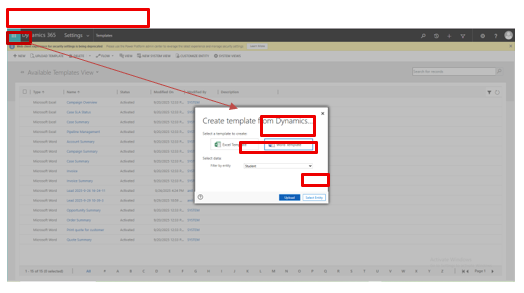
To create New Word Template go to Advance Settings and Click on Template
Under template Click on New button a popup will open in that choose word template and entity
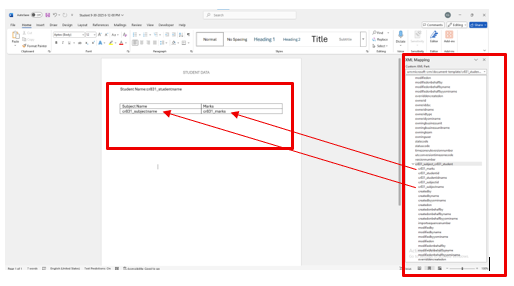
Mapping of Word Template:
In XML Mapping pane have all fields of exported entity and related fields (1:N or N:N) from using this fields we map as our requirement template design.
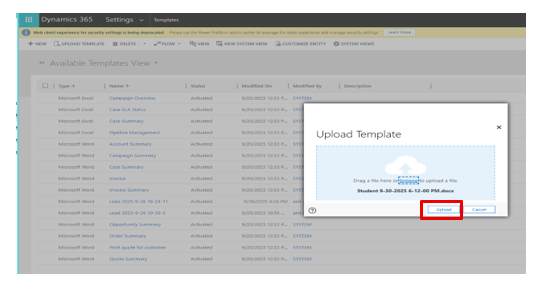
After template design we must Upload that word Template.
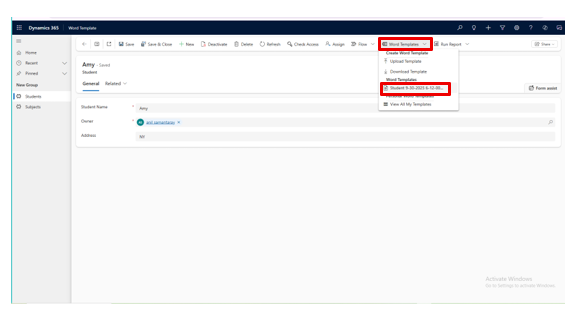
We must Open the Entity Record then we are able to see our word template
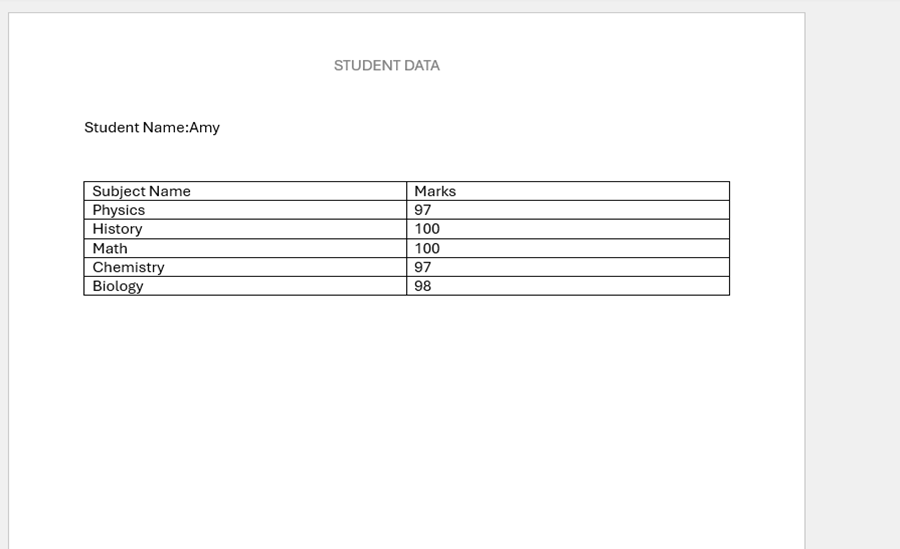
After Download of our Custom word template, we able see the mapped data (as below picture)
How Syncfusion Mail Merge Overcome These limitations
Multi data Source:
In Syncfusion we can connect with multiple data sources like CCRM, other databases, APIs. This provides the user to choose his own database for data source.
Advanced Conditional Grouping:
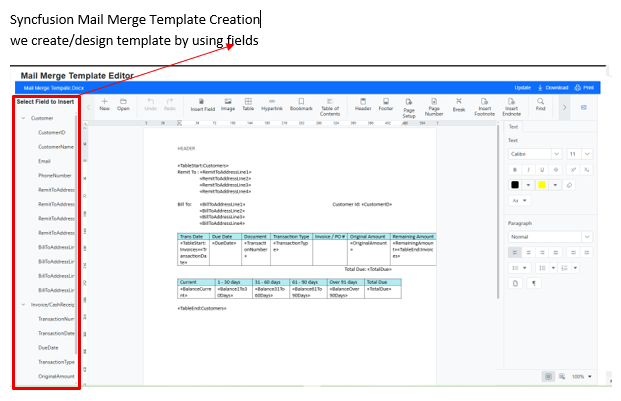
In this Syncfusion mail merge template we can perform logics, we can apply filters on fields. Here we can achieve data separation based on condition like showing data of sum of all records or last 30 days /30-60 days /60 -90 days like these we are able to generate as you want.
Multiple data generation:
In D365 CRM Word Template we can Generate a Single Record at a Time This can overcome by Syncfusion mail merge template here we can generate multiple records automatically on single click this is suitable for all organizations.
Not Required Microsoft Office on User machine:
There is no need of Microsoft word to be installed on users’ machine because we are not designing template on our local /in word. All processing like data mapping and Template Design is Server-side in .NET, so users can design /generate templates on web portals. We are Replaced manual and error prone document generation with Syncfusion automation process.
We replaced manual and error prone document generation with Syncfusion automation process.
This can handle Multiple data Sources/databases User can design his own template and adjust with
Conclusion
The built in Word template feature in Dynamics 365 CRM works for basic Functionalities (work for single record generation, Single data source …etc ), but growing business require more power and flexibility. Through Syncfusion mail merge Template document generation, we overcame limitations—transforming our document automation capabilities to meet real business needs.
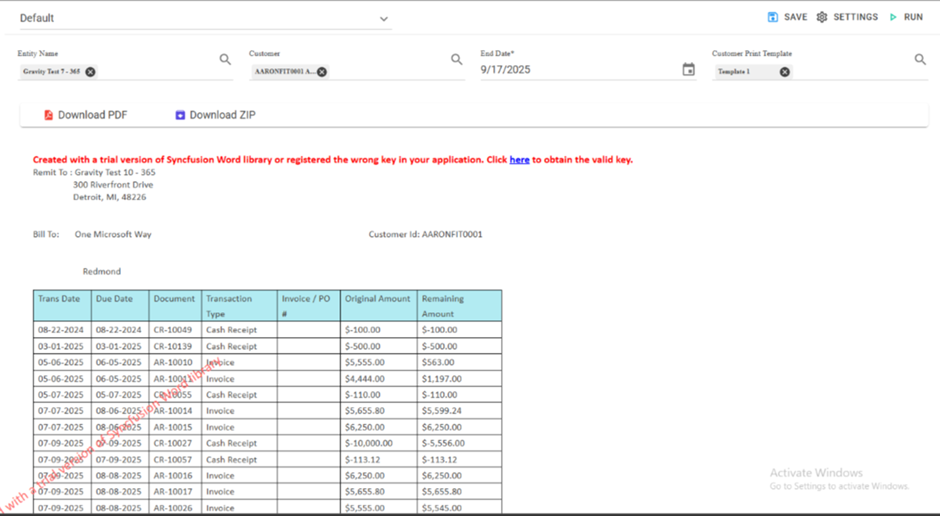
We are using that template and clicking Run then the Customers data is shown as template Design (here we can apply multiple customers at a time, able to download individual data and send emails).