
D365 License Intelligence Accelerator
Smarter visibility into how Dynamics 365 Finance & Operations is actually used — so license decisions are made with data, not spreadsheets.
Most F&O environments carry more license cost than they need to. The reason is simple — nobody has clean data on who is using which module. This accelerator captures application telemetry directly inside Dynamics 365 Finance & Operations and converts it into practical usage, license, module, and report insights along with recommendations.
Captured application-level, inside F&O
Per user, per module, per object
Usage buckets, aging, top objects
Data-driven, not guesswork
Why every F&O environment needs this
F&O license spend is often the third or fourth largest line item on a Microsoft renewal. Yet the decision to renew, add, remove, or downgrade licenses is usually made with a Finance-supplied spreadsheet, guesses from module owners, and an internal audit that never quite completes on time.
The gap between what an organisation pays for and what it actually uses in F&O is where the license optimisation opportunity lives — and where the risk of over-buying at the next renewal lives.
This accelerator closes that gap by capturing real user activity inside F&O and turning it into three things administrators and leaders can actually use:
- A per-user view showing usage pattern, current license, activity timeline, and a specific recommendation
- A per-module view showing adoption percentage, aging, top object usage, and whether the module is trending up, flat, or fading
- An object-level view showing which forms, reports, and periodic routines are carrying the workload and which have gone quiet
No consultant interviews. No guesswork. No missed audit deadlines.
What the accelerator shows

User Usage Profile
Provides a consolidated view of each user’s usage pattern, license details, activity timeline, and specific recommendation. See at a glance whether a user is genuinely active, occasional, or effectively dormant — and whether their current license level fits their actual usage.
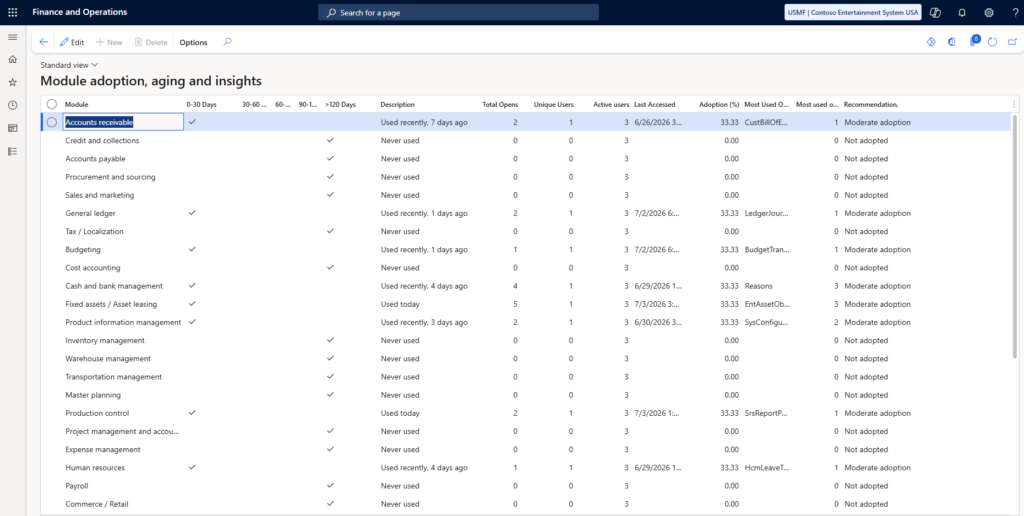
Module Adoption, Aging and Insights
Combines module usage, aging buckets, last-accessed information, adoption percentage, top object usage, and adoption recommendation. Answers the question every leadership team asks and no one has clean data for: which modules are we actually using?
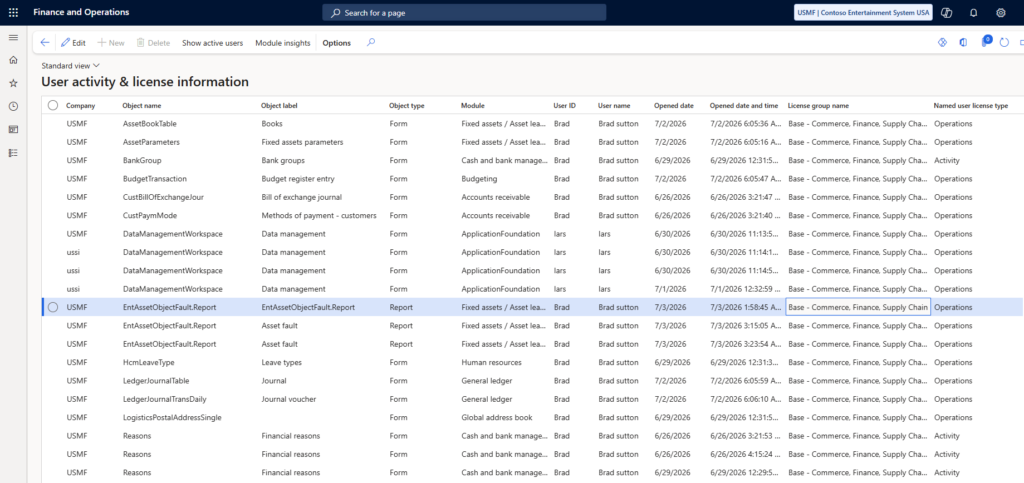
User Activity & License Information
Drill-down telemetry showing object-level activity with module and license context for forms, reports, and periodic routines. When the higher-level views raise a question, this is where the answer lives.
Practical use cases
- Prepare for Microsoft renewal — go into the renewal conversation with real usage data, not vendor-supplied entitlement numbers
- Consolidate licenses — identify users on a higher license tier than their actual usage justifies
- Support module retirement decisions — surface modules that are effectively unused so retirement can be scoped
- Identify low-adoption modules for retraining — modules that are licensed and installed but never used
- Back a license audit — deliver evidence-based conclusions rather than sample-based estimates
- Support M&A due diligence — quickly build a picture of F&O usage in an acquired entity
How the accelerator works
Deploy inside F&O
Deployed as an extension inside the client's Dynamics 365 F&O environment. No external data pipeline, no exports to third-party analytics tools, no data leaving the tenant.
Capture telemetry
Application-level telemetry captures user activity against forms, reports, and periodic routines. Data stays inside the F&O environment and its associated storage.
Report and recommend
The three screens surface the analysis. Recommendations are generated from the underlying telemetry patterns — usage frequency, last-accessed dates, license level relative to activity — and are supported by the raw data underneath.
- F&O administrators who own the license utilisation conversation with Finance
- IT leaders preparing for the next Microsoft renewal
- Finance leaders who want data-backed license decisions, not vendor-driven ones
- Microsoft partners managing F&O environments on behalf of end-user clients
- M&A integration teams needing rapid F&O adoption baselines across acquired entities
Frequently Asked Questions
Is data ever exported outside our F&O environment?
No. The accelerator runs inside your Dynamics 365 Finance & Operations environment. Telemetry stays inside the tenant.
Do we need Power BI to see the reports?
The accelerator’s three primary screens are built inside the F&O interface itself. Where organisations want to combine the telemetry with other data sources, Power BI integration is straightforward but optional.
How long does deployment take?
For a standard F&O environment, deployment is a matter of days rather than weeks. Custom environments with heavy ISV extension footprints may need additional testing.
Does the telemetry capture affect F&O performance?
The accelerator is designed to run without noticeable performance impact on the F&O environment. Load testing is part of every deployment.
Can this be white-labelled for Microsoft partners to deploy for their clients?
Yes. MTC delivers this on a white-label basis for Microsoft partners as well as directly for end-user organisations.
Ready to see it?
The best way to evaluate whether this accelerator is right for your F&O environment is a 30-minute walkthrough. We show the three screens against sandbox data, discuss deployment options for your specific environment, and answer the questions your team will need to answer internally.