If your organisation sends technicians to customer sites — to install, repair, inspect, or maintain equipment — there is a good chance someone has mentioned Dynamics 365 Field Service. It is Microsoft’s market-leading field service management platform, and in 2026 it is one of the most AI-augmented products in the Dynamics 365 family. This post explains what Field Service is, who actually uses it, the core capabilities, what’s new in the 2026 release, and what to plan for before rolling it out.
What you’ll learn:
- What Dynamics 365 Field Service is and the problem it solves
- Who uses it — dispatchers, technicians, inventory managers, service leaders
- The core capabilities: work orders, scheduling, mobile, assets, AI
- What’s new in the 2026 release wave 1
- Four real service-operation problems it solves
- How MTC’s AppSource add-ons extend Field Service in production
- The size of the field service management market and how fast it is growing
- What Gartner and industry analysts predict for AI in field operations
- Where it fits in the broader Microsoft stack
What Dynamics 365 Field Service actually does
Dynamics 365 Field Service is a cloud-based application for managing the full lifecycle of onsite service work — from the moment a service request comes in to the moment the technician closes the work order on their phone. It combines workflow automation, scheduling algorithms, mobility, and AI to make sure the right technician shows up at the right place, at the right time, with the right parts and information.
Microsoft positions the platform around concrete outcomes: improve first-time fix rates, complete more service calls per technician per week, reduce travel time and vehicle wear, communicate accurate arrival times to customers, and give technicians a clean view of account and equipment history before they walk in.
It is part of the broader Dynamics 365 family and integrates natively with Dynamics 365 Sales, Customer Service, Finance, Project Operations, and the Power Platform. For organisations already on Microsoft, that integration is what often tips the decision toward Field Service over a standalone field service tool.
Market context: The global field service management market reached $5.37 billion in 2025 (Fortune Business Insights) and is projected to grow to over $23 billion by 2035 at a CAGR of around 16% (Global Market Insights). Field Service is one of Microsoft’s bets on that growth — and Gartner has Microsoft listed in its 2025 Market Guide for Field Service Management alongside the other major vendors in the space.
Who uses Dynamics 365 Field Service
Field Service is not a single-user product. It supports several roles across the service operation, and each one uses a different slice of the platform.
| Role | What they do in Field Service | Primary surface |
|---|---|---|
| Dispatchers | Review and schedule work orders, assign them to resources, manage the schedule board, handle rescheduling and reassignments | Web browser |
| Field technicians | Receive assigned work orders, view location and step-by-step instructions, check customer asset and service history, update job progress, capture proof of completion | Mobile app (iOS, Android, Windows) |
| Inventory managers | Make sure technicians have the parts and equipment they need, manage returns, purchase new inventory | Web browser |
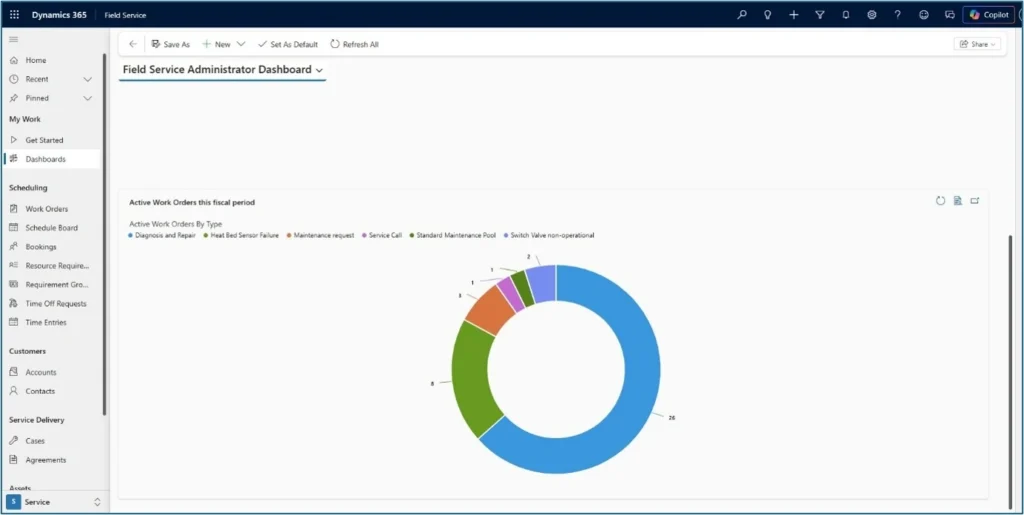
| Service managers and leadership | Monitor operations, track KPIs (first-time fix rate, technician utilisation, customer satisfaction), spot trends and bottlenecks | Web browser, dashboards |
Frontline technicians are the ones who experience Field Service most viscerally — much of the 2026 investment is going into the mobile app for exactly that reason.
Core capabilities
Work order management
The work order is the central object in Field Service. Work orders can be generated from service cases, sales orders, emails, phone calls, service agreements, web portals, or IoT alerts — and they carry everything the technician needs: location, customer history, asset details, instructions, required parts, and skill requirements. The full lifecycle from creation to closure runs inside the platform.
Resource scheduling
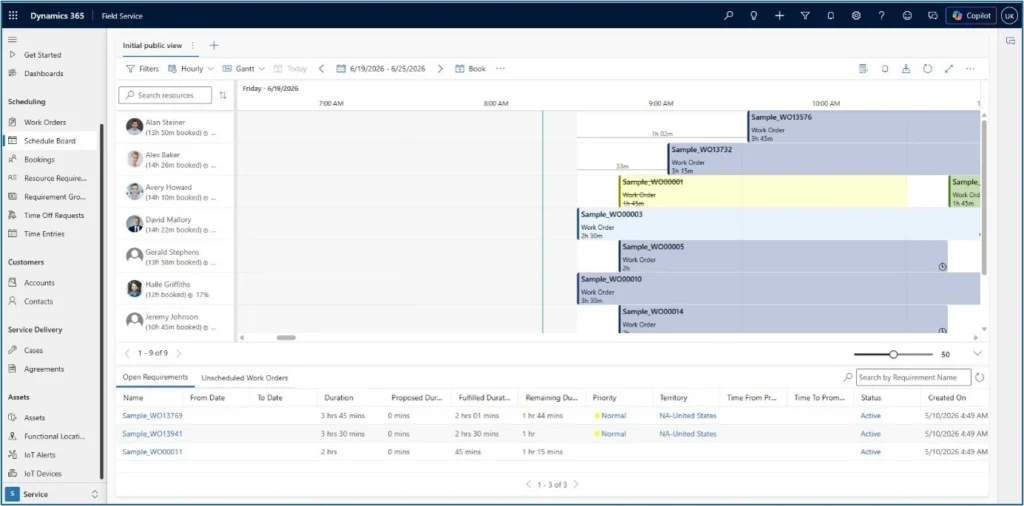
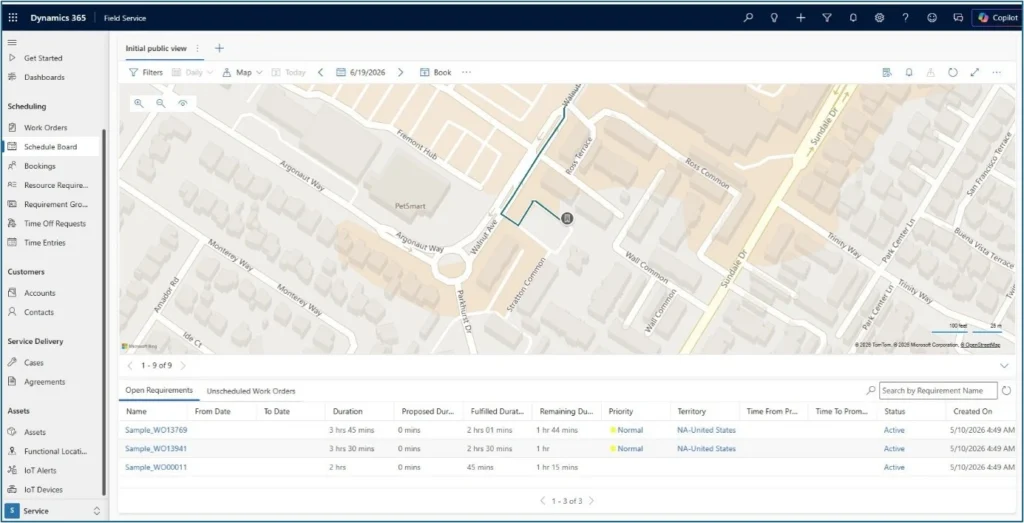
The schedule board gives dispatchers an overview of every resource — employees, contractors, equipment — and their assigned work orders. Resources and routes show on a map with real-time traffic. For more advanced needs, Microsoft offers the Resource Scheduling Optimization (RSO) add-in that automatically optimises schedules across constraints like location, skill, priority, and SLA.
Mobile app for technicians
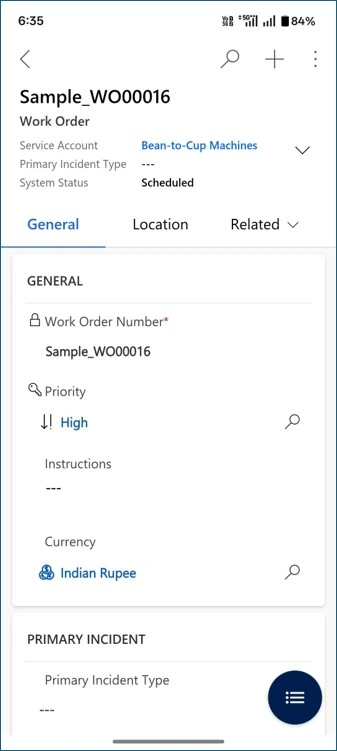
The Dynamics 365 Field Service mobile app is how technicians live in Field Service. It guides them through the work order, supports offline use (essential for sites with no signal), and gives them quick access to instructions, photos, and customer history. Copilot now provides quick summaries of each work order and helps technicians update work orders by voice, which removes a lot of the form-filling that used to slow them down.
Asset tracking
Field Service treats the equipment being serviced as a first-class object. Asset records carry full service history, warranty data, location, and condition information, so when a technician opens a work order they see exactly what they are about to work on — and the platform can recommend preventive maintenance based on patterns across similar assets.
AI and Copilot
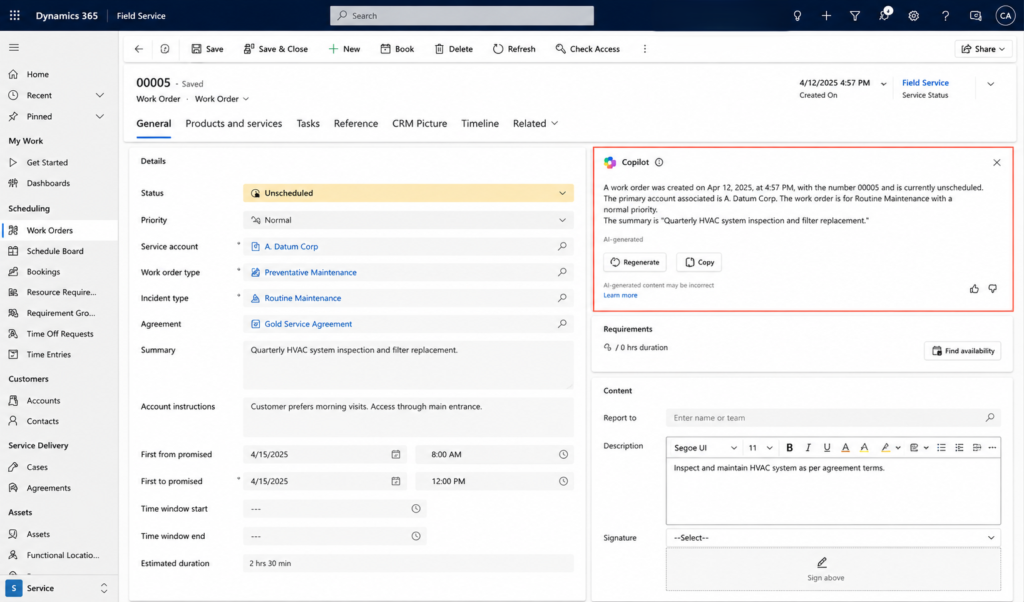
Copilot is now embedded across Field Service — drafting work order summaries, suggesting next actions, helping technicians find answers, and increasingly scheduling work autonomously through the new Scheduling Operations Agent (more on that below).
IoT-driven predictive service
Field Service connects to Azure IoT Hub, so connected equipment can send telemetry directly to Microsoft. When thresholds are breached, alerts generate cases in Customer Service and Field Service automatically creates the work order — turning reactive break-fix service into predictive maintenance.
What’s new in 2026 release wave 1
Microsoft’s 2026 release wave 1 (April–September 2026) brings several investments worth knowing about:
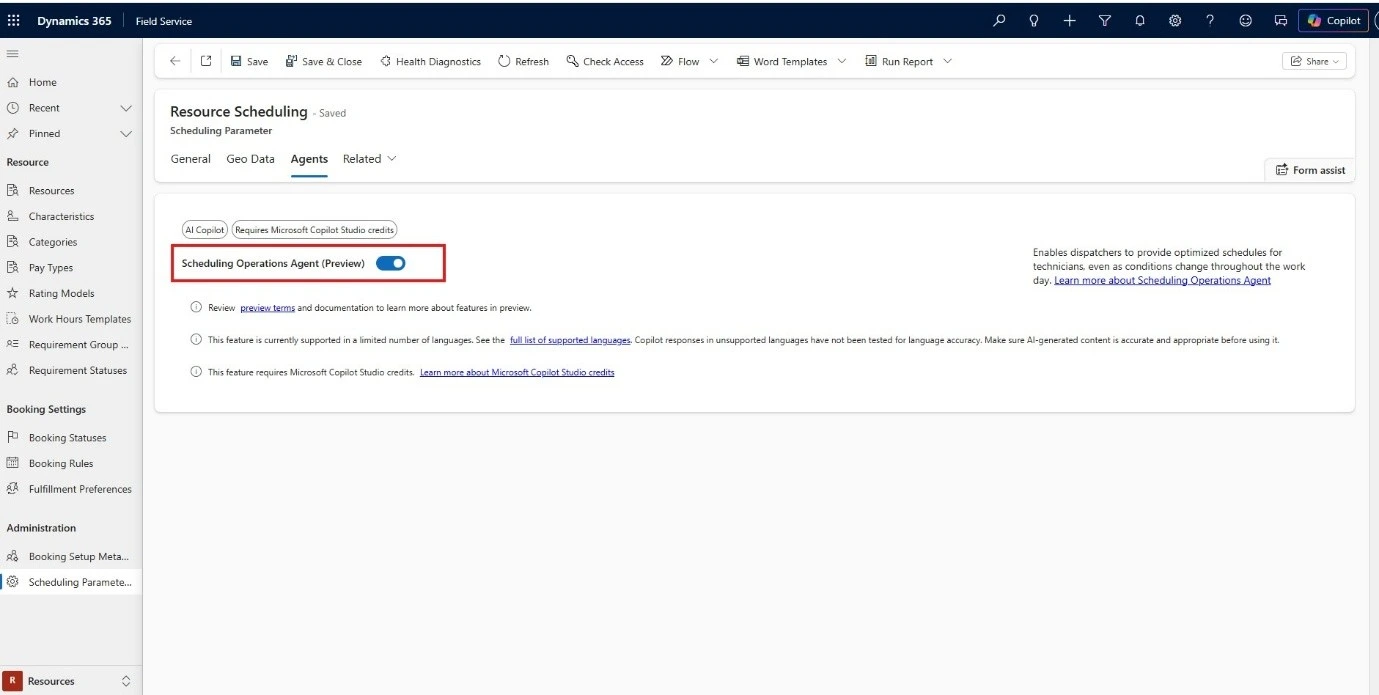
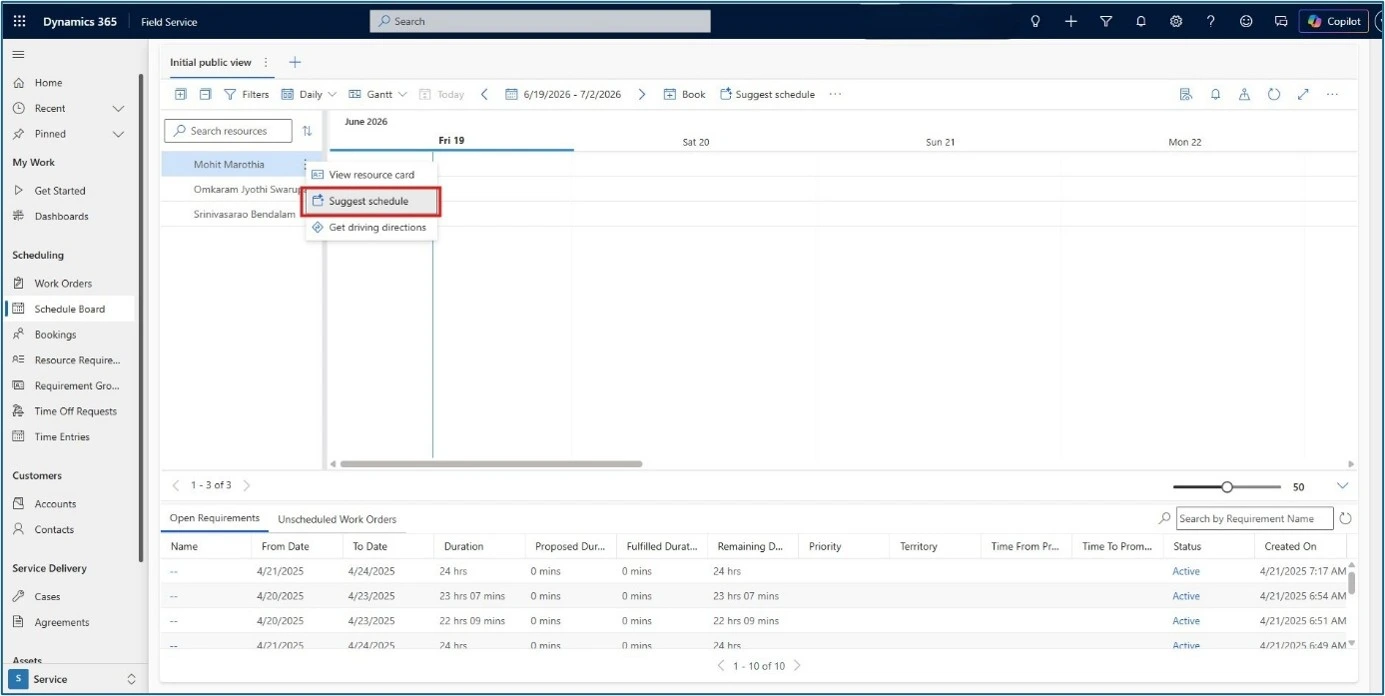
- Scheduling Operations Agent (SOA) — expanded capabilities making AI-driven scheduling practical for daily operations, not just experiments.


- Mobile app reliability and usability — focused improvements for both online and offline scenarios, plus new in-app controls that get technicians in and out of common workflows faster.
- Asset management enhancements — better maintenance planning and asset location, stronger asset context inside work orders.

- Project Operations integration — project tasks can now be converted directly into Field Service work orders, with project-driven context (timelines, dependencies, advisory warnings) visible to dispatchers, and time entries flowing back into Project Operations for accurate billing.
- Schedule board improvements — move multiple bookings at once by a set offset, plus clearer scheduling views for faster decisions.
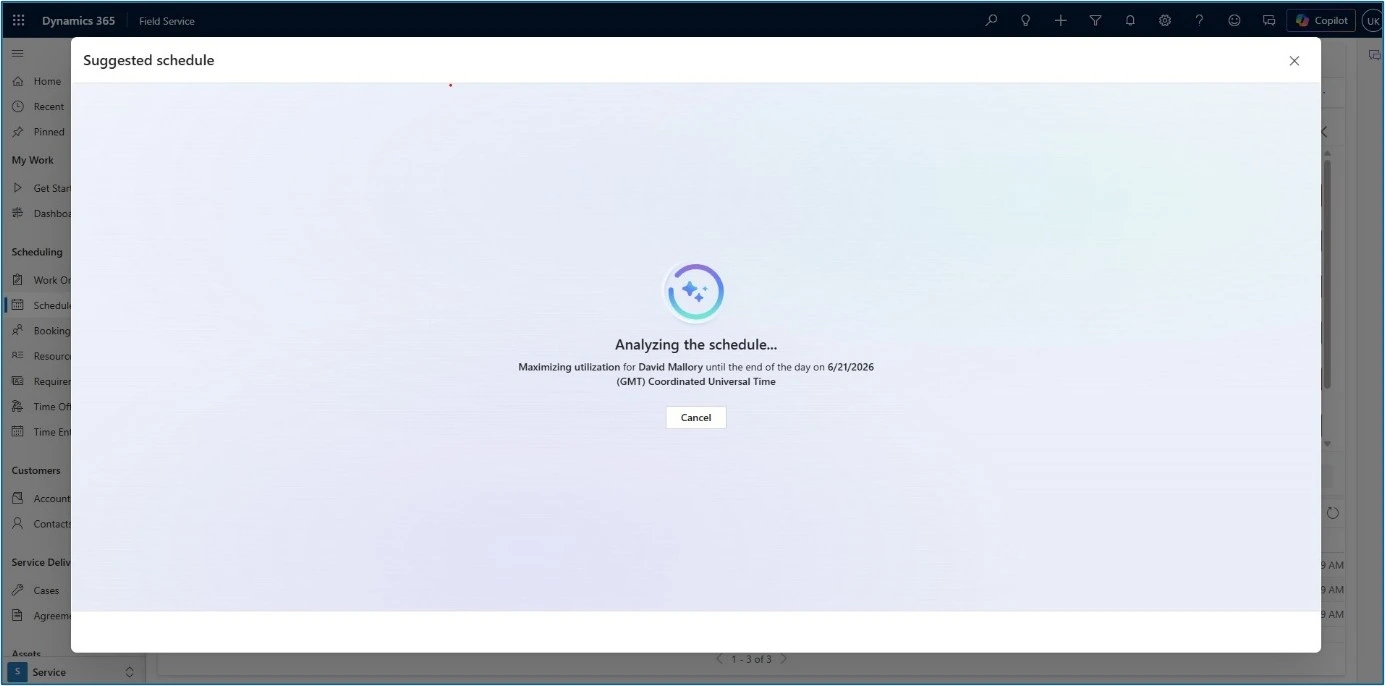
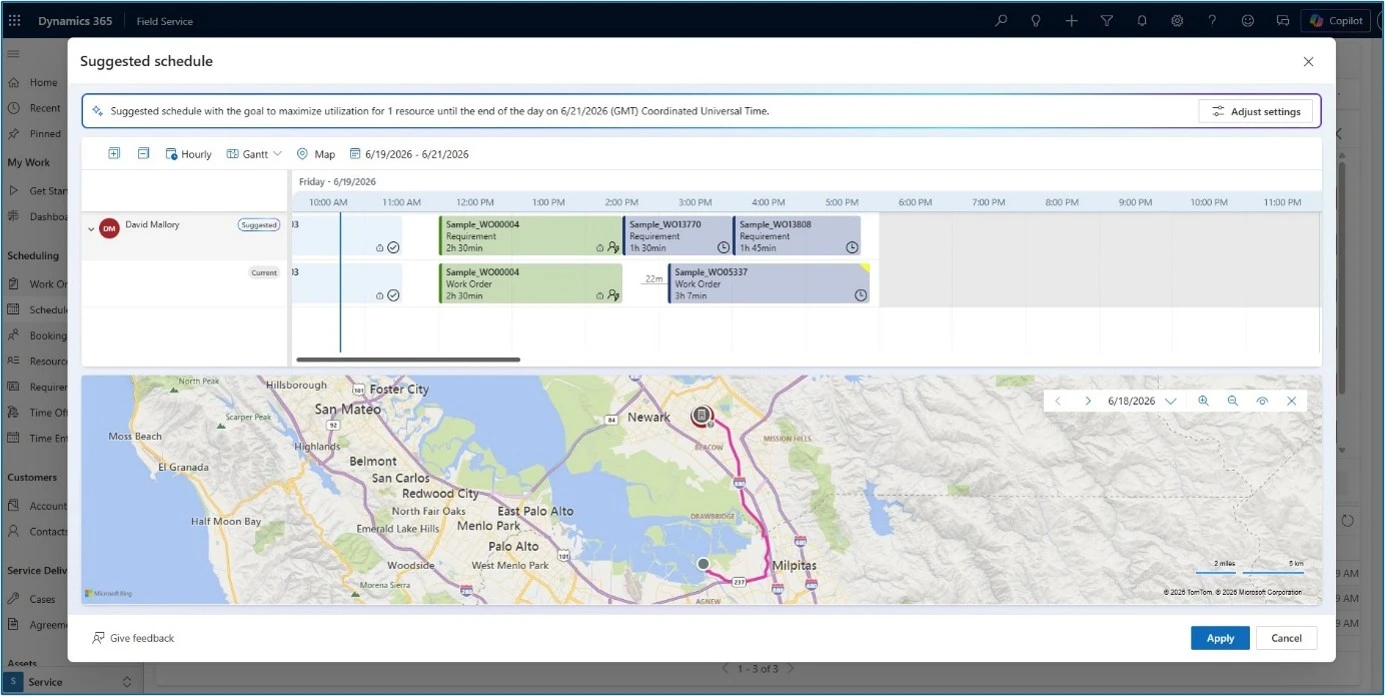
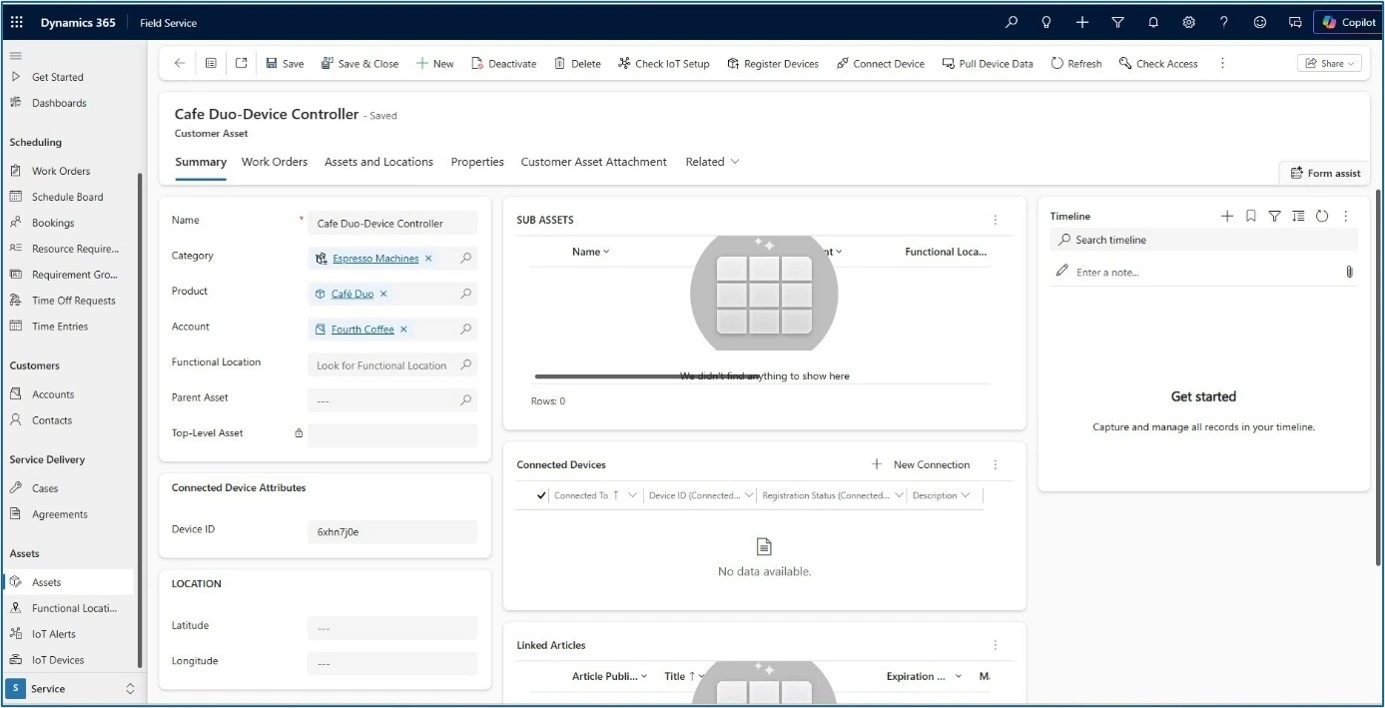
Together, these are not headline-grabbing changes — they are the kind of investments that compound: faster mobile workflows, smarter scheduling, cleaner data, tighter integration.
Problems Dynamics 365 Field Service solves
Problem 1: Dispatchers spend their day firefighting schedules
A technician calls in sick, a job runs long, traffic shifts, a customer reschedules — and the dispatcher’s morning plan is wrecked by 10am. Most of the day is spent reshuffling rather than thinking strategically about service capacity.
How Field Service solves it: the schedule board gives dispatchers real-time visibility into every resource, the Resource Scheduling Optimization add-in reshuffles automatically against constraints (skill, location, SLA, travel time), and the Scheduling Operations Agent now takes on routine scheduling decisions directly. Dispatchers move from firefighting to exception handling.
Problem 2: Technicians arrive without the context they need
A technician shows up, finds out the customer mentioned a different issue last month, doesn’t have the right part, has to call back to the office for instructions, and the first visit ends in a follow-up rather than a fix. First-time fix rates suffer and customer satisfaction with them.
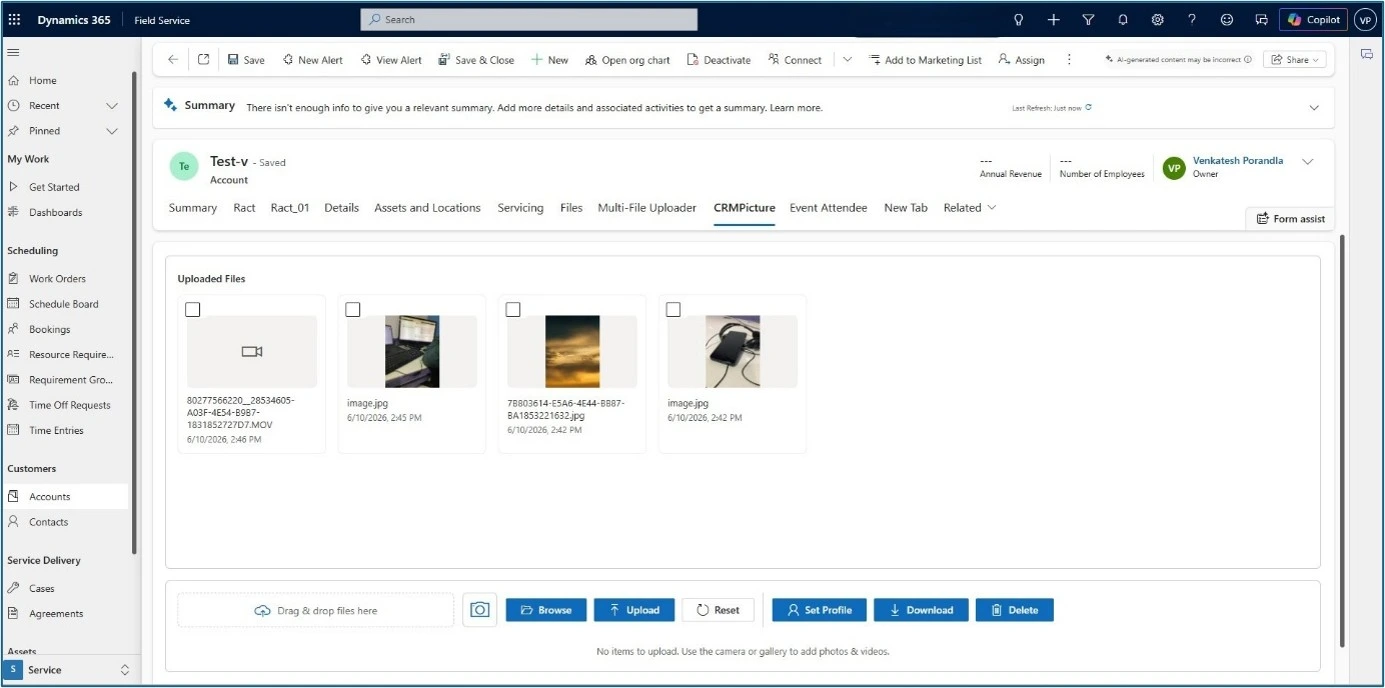
How Field Service solves it: every work order on the mobile app carries account history, asset records, service history, step-by-step instructions, and required parts. Copilot summarises the work order in plain language so the technician walks in with the picture, not just the address. For asset-heavy environments, MTC’s CRM Picture AppSource add-on extends this further by attaching photos directly to records — so the technician sees what the equipment actually looks like, not just a part number on a screen.
Problem 3: Equipment failures happen before anyone notices
Traditional service is reactive — customers report a problem, a work order is created, a technician is dispatched. By the time a service organisation hears about an issue, the equipment has already failed and the customer is already unhappy.
How Field Service solves it: IoT integration through Azure means equipment talks to Field Service directly. Sensor telemetry triggers alerts, work orders are auto-created against the right asset, and a technician is dispatched before the failure cascades. The shift is from “fix what broke” to “prevent the break.”
Problem 4: Photos, forms, and proof-of-completion pile up in the wrong places
Field service is one of the most document-heavy workflows in any business. A single work order can produce a dozen site photos, a signed completion form, a parts list, a before-and-after asset shot, a customer signature, and an inspection checklist. Without the right tooling, those files end up in personal phones, email attachments, and a Notes field in Dataverse — driving up storage cost, breaking audit trails, and making it impossible to find anything six months later.
How Field Service solves it: native Field Service supports attachments, but for high-volume document capture two MTC AppSource add-ons make the difference in production:
- Multifile Uploader — lets technicians upload multiple files at once from the mobile app or browser, attach them to the work order or asset, and tag them by type (site photo, signature, completion form, inspection). Saves the back-and-forth of single-file uploads on a slow site Wi-Fi connection.

- CRM Picture — captures, attaches, and organises photos directly against the work order, customer, or asset record. Useful for both pre-visit context (asset photos technicians see before walking in) and proof-of-completion (after-shots the office can audit).

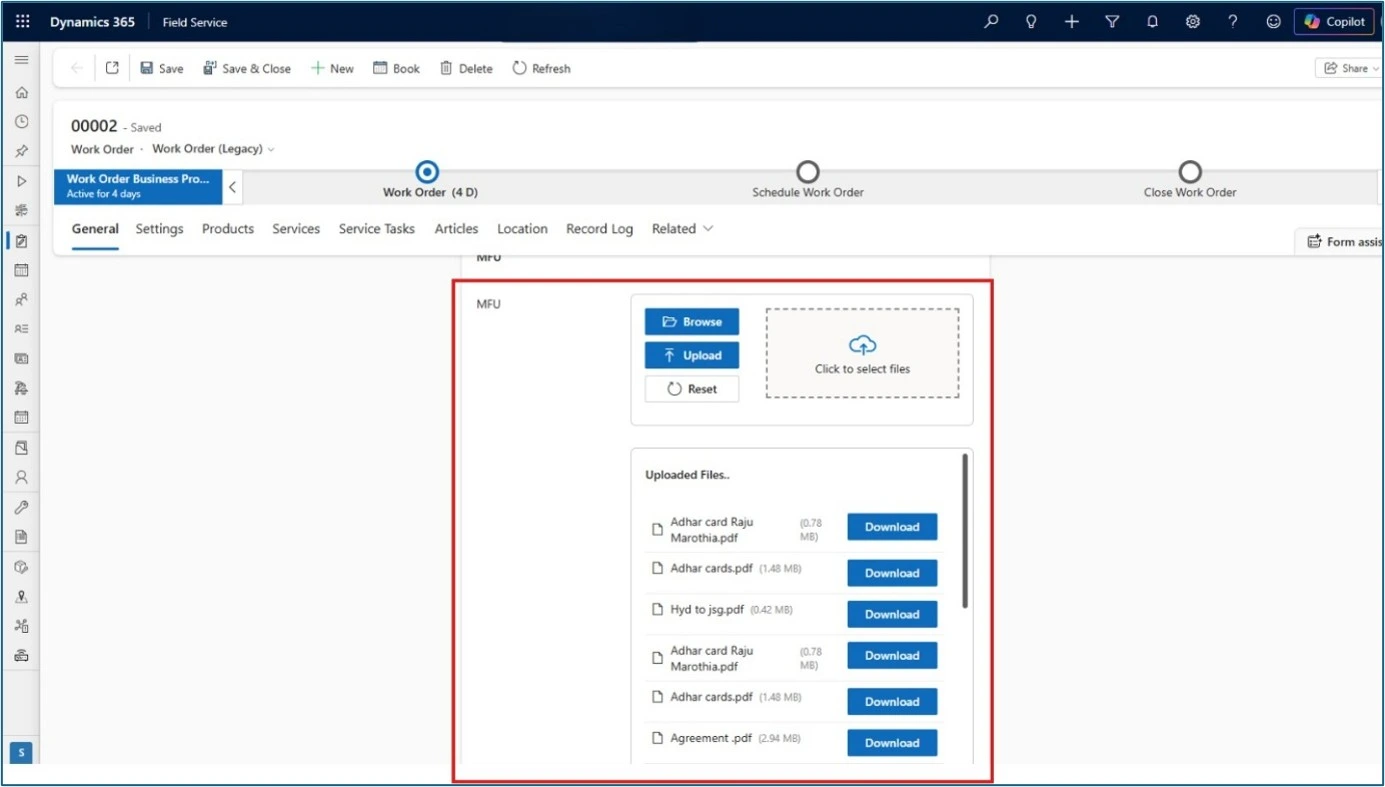
For the storage side of this — keeping documents out of expensive Dataverse and in cheaper SharePoint — see our guide on moving Dynamics 365 attachments to SharePoint (the automation pairs cleanly with both add-ons above).
How Field Service fits in the broader Microsoft stack
Field Service is most powerful when it is not deployed alone. The native integrations are what differentiate it from standalone field service tools:
- Dynamics 365 Customer Service — incoming cases flow into Field Service work orders. Related reading: our Case Management Agent setup guide.
- Dynamics 365 Sales — service agreements and sold equipment generate work orders automatically.
- Dynamics 365 Project Operations — for project-based service organisations, project tasks now feed Field Service work orders directly.
- Dynamics 365 Finance / Supply Chain — for inventory, parts, and financial flow.
- Power Platform — Power Automate for custom workflows, Power Apps for custom mobile experiences, Power BI for service analytics.
- Microsoft Teams — technicians collaborate with the back office without context-switching.
- Azure IoT — connected equipment triggers predictive maintenance work orders.
The work-order data itself often needs to live somewhere more cost-effective than Dataverse — see our guide on moving Dynamics 365 attachments to SharePoint for the pattern we use on Field Service projects with heavy photo and document capture.
Frequently Asked Questions
How big is the field service management market?
The field service management market is one of the fastest-growing enterprise software categories. Fortune Business Insights valued the global FSM market at $5.37 billion in 2025, rising to $6.14 billion in 2026. Global Market Insights projects the market to reach $23.61 billion by 2035 at a CAGR of 16%, driven by predictive maintenance adoption, AI copilots, IoT-connected asset growth, and the move from on-premises to cloud-based platforms. Dynamics 365 Field Service is one of the platforms named in Gartner’s 2025 Market Guide for Field Service Management alongside the other major vendors in the space.
What do analysts predict for AI in field operations?
Gartner has been clear about the direction. In August 2025, it forecast that 40% of enterprise applications will integrate task-specific AI agents by the end of 2026, up from less than 5% in 2025. Field Service is one of the leading examples inside Dynamics 365 — Copilot is now embedded throughout the technician and dispatcher workflows, and the new Scheduling Operations Agent is exactly the kind of task-specific agent Gartner is referring to. Anushree Verma, Senior Director Analyst at Gartner, described the shift as transforming enterprise applications from tools that support individual productivity into platforms that enable autonomous collaboration and workflow orchestration — which is essentially what an AI-driven scheduling agent does for a service operation. The shift is already visible in adoption: across the broader field service industry, organisations report that intelligent scheduling delivers double-digit improvements in technician utilisation, which on a ten-person team is the equivalent of one or two extra technicians without any new hires.
Won’t AI replace field technicians and dispatchers?
The current analyst position is no — technology spend is rising rapidly, but talent needs are evolving rather than disappearing. In March 2026, Gartner forecast that by 2028, over 50% of customer service organisations will double their technology spend without an equivalent reduction in talent. The Field Service direction matches this: Copilot and the Scheduling Operations Agent take routine work off dispatchers and technicians so they can focus on judgment calls — handling exceptions, complex repairs, customer relationships. The platform removes paperwork, not people.
Does Dynamics 365 Field Service work offline?
Yes. The mobile app supports offline mode, which matters for technicians working in basements, remote sites, or anywhere with patchy signal. Microsoft’s 2026 release wave 1 specifically invests in offline reliability and performance, with new controls to help technicians complete common workflows faster.
Is it suitable for small service operations or only enterprises?
Field Service scales from mid-sized service operations to large enterprises. The platform is most cost-effective for organisations already on Dynamics 365 or planning to be — the integration value with Sales, Customer Service, and Finance is what tips the ROI. Standalone field service tools may be cheaper for very small operations not running anything else in the Microsoft stack.
What does a typical Dynamics 365 Field Service rollout look like?
A rollout usually covers discovery (current processes, mobile workflows, integration points), data setup (assets, customers, services, parts, resources), scheduling configuration (skills, territories, SLAs, RSO rules), mobile rollout (devices, offline configuration, technician training), and integration (Customer Service, Finance, Project Operations, IoT if relevant). Most organisations work with a Microsoft partner for the meaningful deployment work — the configuration depth makes a self-implementation difficult.
Conclusion
Dynamics 365 Field Service is the connective tissue between your customers, your service work, and your field team. It standardises the work order lifecycle, gives dispatchers a live view of every resource, puts the right context in the technician’s hand, and increasingly takes routine work off everyone through Copilot and AI agents. In 2026, the investments in mobile, scheduling, asset management, and Project Operations integration make it more capable than it has ever been — and for organisations already in the Microsoft ecosystem, the integration depth makes it hard to beat.
Planning a Dynamics 365 Field Service rollout? MTC delivers Field Service implementations and integrations for Microsoft partners and their clients — including the configuration, mobile rollout, IoT integration, and post-go-live optimisation work that makes the platform stick. Explore our Dynamics 365 Field Service services or email salesteam@mtccrm.com.