Most B2B companies looking to launch a customer portal on Dynamics 365 start in the same place: Power Pages. It is Microsoft’s supported product, sits inside the Power Platform, and integrates natively with Dataverse. For a lot of use cases, that is exactly the right answer. For some others, it becomes an expensive mistake by month six.
This post is a practical decision framework for choosing between Microsoft Power Pages and a custom React portal — grounded in the trade-offs that actually matter in production, not the ones that sound good in a Microsoft pitch deck. We also walk through LiteDesk, a lightweight service desk we built as a custom React portal rather than on Power Pages, and explain why.
What you’ll learn:
- What Power Pages is genuinely great at
- Where Power Pages starts to hurt at scale
- What a custom React portal gets you that Power Pages does not
- A simple decision table by use case
- Why we built LiteDesk custom instead of on Power Pages
- How to think about long-term cost, not just build cost
What Power Pages is genuinely great at
Before the trade-offs, credit where credit is due. Power Pages is the right answer for a lot of B2B portal scenarios:
- Fast to stand up. A working portal against Dataverse in days, not weeks.
- Native Dataverse and Dynamics 365 integration. No custom API layer, no re-implementing security. Web roles and table permissions handle authorisation out of the box — see our Power Pages security guide for the full model.
- Low-code forms and lists. Business users can extend the portal without a developer for every change.
- Built-in authentication. Microsoft Entra ID, Entra External ID (B2C), LinkedIn, Google, Microsoft, and custom OpenID Connect providers — all included, no separate identity infrastructure.
- Microsoft-managed runtime. CDN, WAF, scaling, security patching all included. No servers to run.
- Predictable ALM. Portal assets deploy through the same pipelines as the rest of the Power Platform.
For a customer portal with a few hundred authenticated users, standard case management, standard forms, and no unusual UX requirements, Power Pages is genuinely hard to beat.
Where Power Pages starts to hurt
The trade-offs show up in three specific places.
1. Licensing cost at scale
Power Pages is priced by capacity packs — 100 authenticated users or 500 anonymous users per pack per month, per website. This model is fine at small scale. It becomes expensive fast when the portal grows.
We cover the full pricing model in our Power Pages pricing 2026 guide — the short version is that once an authenticated portal moves past roughly 500 users, the running cost of a Power Pages site starts to compete with the hosting cost of a custom-built alternative. Above 1,000 authenticated users, a custom React portal on Azure App Service is usually cheaper to run — often meaningfully cheaper — and the gap widens with scale.
For a client-facing service desk or B2B customer portal expected to reach thousands of authenticated users, the licensing math matters more than the initial build cost.
2. UI and UX limitations
Power Pages gives you a lot for free — but the price of that “for free” is a template-driven UX. The design studio has improved significantly, and SPA support went GA in February 2026 for teams who want to bring React inside the Power Pages runtime. Even so, if the portal needs pixel-perfect UI, unusual interaction patterns, or a particular brand experience, the Power Pages runtime imposes limits that a fully custom React app does not.
3. Runtime overhead
Power Pages runs a full CMS stack under the hood. That gives you the low-code features you want, but it also means every page load carries CMS overhead. For portals with heavy interactive components, real-time updates, or performance-sensitive workflows, a purpose-built React app talking directly to the Dataverse Web API is faster — noticeably so.
What a custom React portal buys you
- Full UI and UX control. No template constraints.
- Direct hosting cost model. Azure App Service or similar — flat cost, not per-login.
- No per-user licence cap. Portal usage scales with hosting, not licensing.
- Tailored performance. Client-side rendering, targeted caching, optimised bundle size.
- Freedom to bring any front-end pattern. SPAs, PWAs, server-side rendered React — whatever the use case needs.
The trade-offs are real too. You are responsible for hosting, security patching, identity integration, and the full ALM story. What Microsoft manages for you in Power Pages, you now manage yourself.
Case in point: why we built LiteDesk custom
LiteDesk is a lightweight service desk portal MTC built to sit alongside Dynamics 365 Customer Service. It gives customers a place to raise tickets, check status, and access knowledge articles. It gives agents a clean interface inside Power Apps to work those tickets against SLAs (Entitlements) and reusable Knowledge Articles.
We considered Power Pages for LiteDesk. We chose custom React. Here is why.
The invitation and login flow — clean by design
LiteDesk starts with an administrator sending an invitation to a customer contact from Dynamics 365. The customer receives the email, follows the link, and lands on the LiteDesk portal login page. Authentication is handled through Microsoft Entra External ID, so the identity story is production-grade without inheriting the Power Pages runtime.
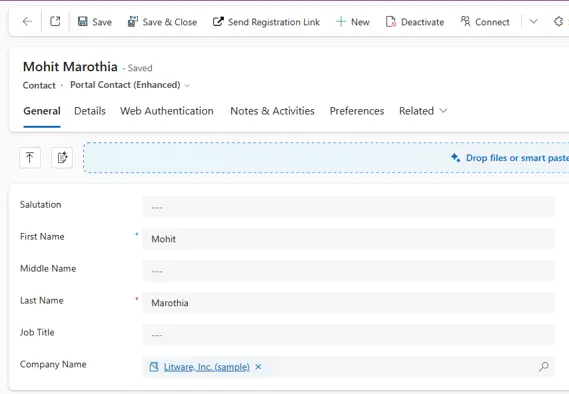
Fig. 1: Sending a portal invitation from Dynamics 365 to a customer contact
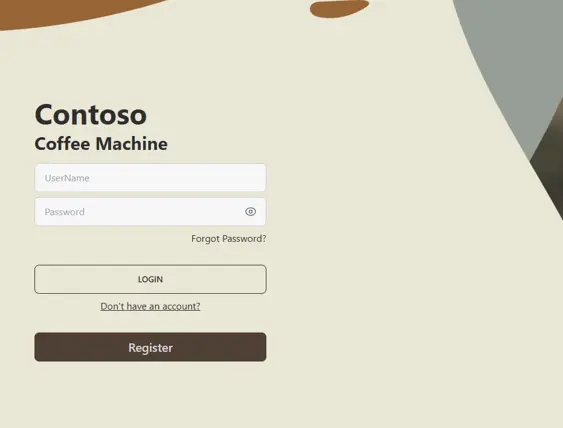
Fig. 2: LiteDesk customer portal login page
Raising and tracking tickets — direct to Dataverse
Once signed in, the customer raises a support ticket directly through the portal. Tickets create Case records in Dynamics 365 Customer Service, and the customer can check status and history on their existing tickets whenever they want.
Because the portal talks directly to the Dataverse Web API, the round-trip is fast and the UX is entirely under our control.
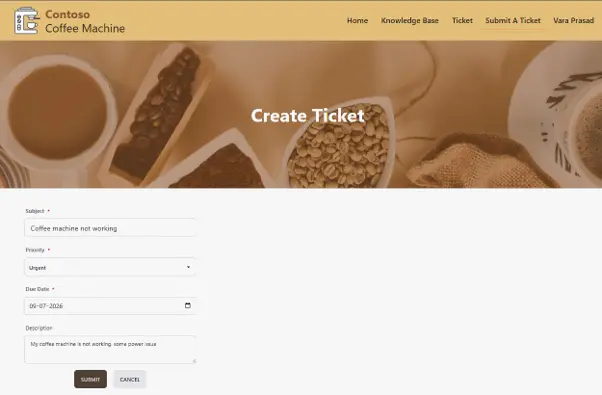
Fig. 3: Customer raising a support ticket through the LiteDesk portal
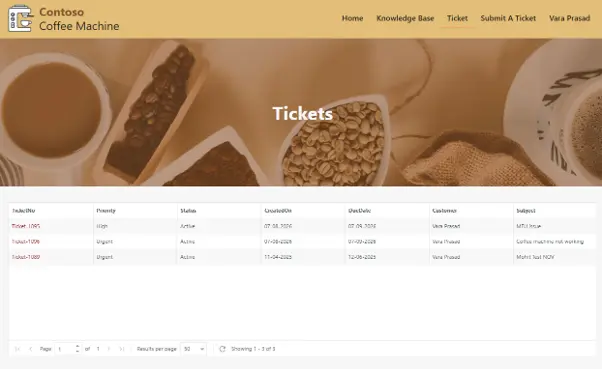
Fig. 4: Customer checking updates on existing tickets in LiteDesk
Agent side — Power Apps, not a portal
Agents work tickets inside a standard Power Apps model-driven interface. No secondary UI to maintain. This is deliberate — the agent experience is a Microsoft strength, and there is no benefit to rebuilding it.
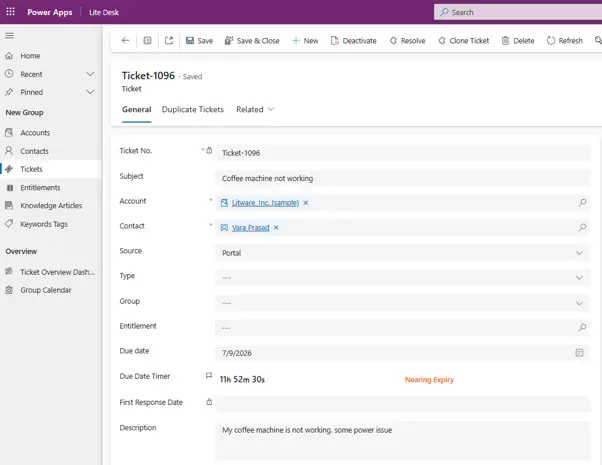
Fig. 5: Agent interface in Power Apps for LiteDesk tickets
SLAs via Entitlements
Every case is tied to an Entitlement record that captures the customer’s support agreement — hours covered, response times, terms of service. Entitlements are a native Dynamics 365 Customer Service feature. LiteDesk uses them as-is.
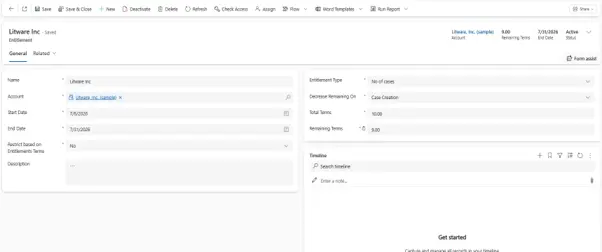
Fig. 6: Entitlement record tied to a case in Dynamics 365 Customer Service
Self-service via Knowledge Articles and keyword tags
The portal exposes a Knowledge Articles library with keyword tags so customers can find answers without raising a ticket. Reduces case volume, improves customer experience, keeps the agent team focused on the tickets that actually need a human.
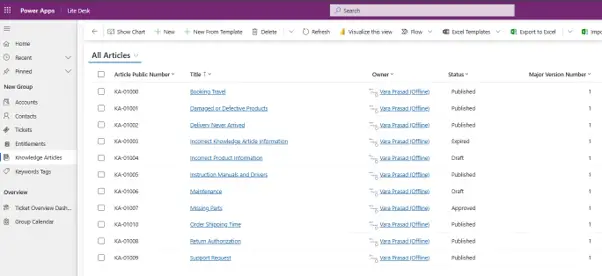
Fig. 7: Knowledge Articles library in the LiteDesk portal
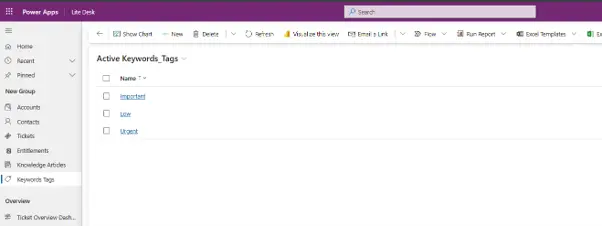
Fig. 8: Keyword tags on knowledge articles in LiteDesk
Why not Power Pages for LiteDesk
Two reasons:
- Cost trajectory. LiteDesk is designed for service desks with thousands of end customers over time. Per-login capacity pack pricing would have doubled the total cost of ownership before the client hit their user projection.
- Speed and control. The team wanted the ticket-raising UX to feel like a modern web app, not a form on a portal. React let us design the experience without fighting a CMS runtime.
Neither of these is a Power Pages failing. They are choices about fit.
Decision framework: which one for your use case
| Use case | Recommended | Why |
|---|---|---|
| Customer portal, <500 authenticated users, standard forms | Power Pages | Fast, low-code, native integration wins |
| Partner portal, standard workflows, low UX customisation | Power Pages | Same as above |
| Employee portal for HR, expenses, IT support | Power Pages | Standard scenarios, low friction |
| B2B customer portal, 1,000+ authenticated users, service desk pattern | Custom React | Licensing cost compounds against hosting cost |
| Portal with custom UI/UX or brand-heavy experience | Custom React | Template constraints hurt |
| Portal with real-time interactivity, complex client-side state | Custom React | React runtime wins |
| Portal that needs to integrate deeply with non-Microsoft components | Custom React | More flexibility |
| Time-to-market critical, standard functionality acceptable | Power Pages | Weeks vs months |
| Team has strong Dataverse + Dynamics 365 skills, no React expertise | Power Pages | Play to strengths |
| The client’s tenant has already committed to Power Pages capacity | Power Pages | Sunk cost is real |
The pattern is straightforward: standard use case at standard scale → Power Pages. Non-standard use case or non-standard scale → custom React.
How to think about long-term cost, not just build cost
The mistake we see most often is teams deciding on portal technology based on build cost — Power Pages wins that comparison almost every time. The right comparison is total cost of ownership over three years, including:
- Licensing / hosting — capacity packs for Power Pages, App Service for React
- Ongoing enhancement work — how easy is it to change things later?
- Team skills required — do you have Power Platform depth, React depth, or both?
- Governance and support — one Microsoft support surface (Power Pages) vs your own team supporting a custom stack
At small scale, Power Pages usually wins on all four. At large scale, at least one of them tips toward custom — and the earlier a team notices which, the cheaper the correction.
Conclusion
The right question is not “should we use Power Pages or a custom portal?” The right question is “what does our use case actually need, and what will it look like at the scale we are heading for?” Answer that honestly and the technology choice usually picks itself.
At MTC, we build both. We built LiteDesk as a custom React portal because that was the right fit for a service desk product designed to scale into the thousands of authenticated end customers. For a client running a standard B2B customer portal against Dynamics 365 with 200 authenticated users, we recommend Power Pages every time.
Weighing up portal options for a B2B project? MTC helps clients think through the trade-offs and build the right solution — whether that is Power Pages, a custom React portal, or a hybrid. Explore our Power Pages services or email salesteam@mtccrm.com.