
Most B2B customer portals for Microsoft Dynamics 365 start on Power Pages — and for a lot of use cases, that is the right choice. For customer bases that will scale into the thousands of authenticated users, for portals that need a modern web-app feel rather than a template-driven CMS, or for teams that want full control over the front-end experience, a custom-built alternative often wins on both cost and UX. This post walks through a B2B customer portal MTC has built and can demonstrate — a fully custom React front-end paired with Microsoft Entra External ID for authentication, Dataverse as the data store, and Power Automate for the invitation lifecycle.
If your team is still deciding between Power Pages and a custom build, see our companion post Power Pages vs Custom React Portal: Which Is Right for Your B2B Customer Portal?
What you’ll learn:
- The architecture behind a production-grade B2B customer portal on Microsoft
- The invitation and sign-up flow, step by step
- How Microsoft Entra External ID handles the identity layer
- How Contact records in Dataverse stay linked to the portal user
- Where Power Automate fits in the invitation lifecycle
- Where this pattern fits versus a Power Pages portal
Why this architecture
A B2B customer portal needs to do several things well at the same time:
- Prove who the user is to a production security standard
- Keep customer data isolated so every signed-in customer sees only their own data
- Handle the invitation-and-onboarding flow cleanly — nobody wants a portal where accounts are created in a support ticket
- Feel like a modern web app to the customer using it every week
- Stay affordable at scale, especially when the customer base grows past the price point where per-login licensing becomes the biggest line item
Microsoft’s stack gives you the pieces to do this without stitching together third-party products. Microsoft Entra External ID handles identity for external users at production standard. Dataverse stores the Contact records and any business data the portal needs to expose. Power Automate orchestrates the invitation lifecycle. A custom React front-end hosted on Azure App Service gives you full control over the customer-facing experience. The build described in this post is a working example MTC has developed and can demonstrate — it is not a shipped product with a price list, it is a proven pattern we deliver on client engagements.
Architecture overview
The picture is straightforward:
Customer's browser
  │
  ▼
React portal (Azure App Service)
  │
  ├── Microsoft Entra External ID  ← identity provider
  │
  └── Dataverse Web API  ← business data (Contact, Cases, Invoices, etc.)
       │
       └── Power Automate  ← invitation lifecycle + workflow
The customer sees a single web app. Under the hood, three Microsoft services handle their respective jobs and stay in their lanes — the front-end never talks to Dataverse directly without an authenticated Entra External ID session, and the invitation record in Dataverse is the mechanism that ties the identity in Entra to the Contact record in Dynamics 365.
The invitation and sign-up flow, step by step
1. Administrator sends the invitation
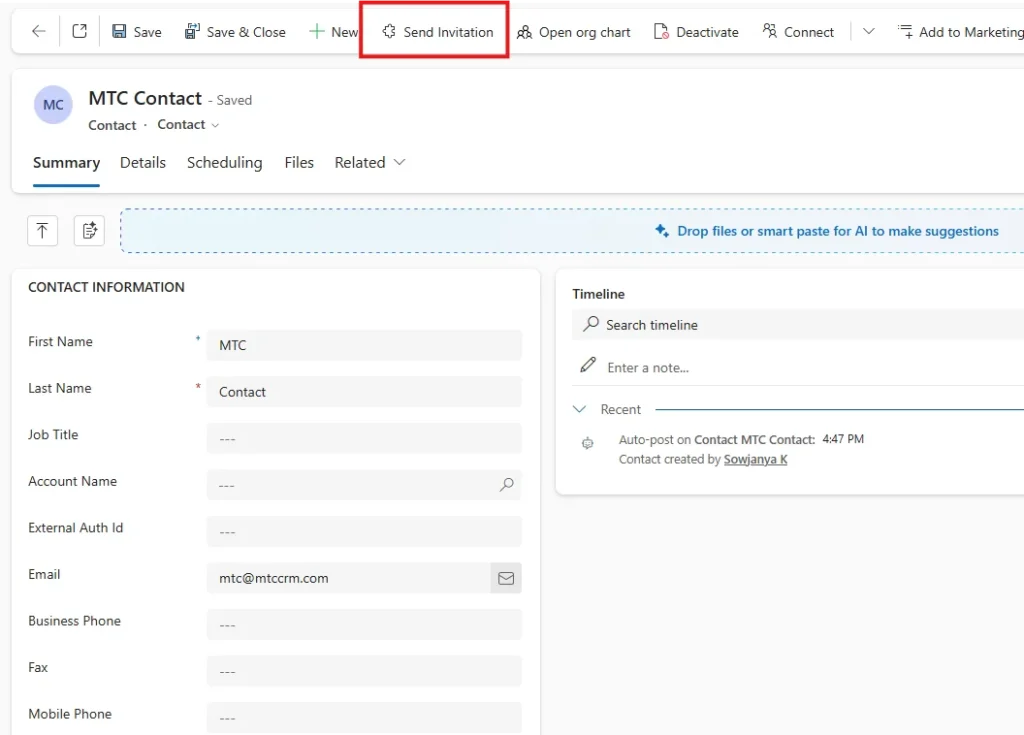
In Dynamics 365 CRM, the administrator opens a Contact record and clicks the Send Invitation button.
This is a custom command on the Contact form. It triggers a Power Automate flow that creates an Invitation record in Dataverse and sends an invitation email to the contact’s address.
2. Invitation record is created in Dataverse
The invitation record captures the invitation code, the Contact it belongs to, the expiry, and the redemption status. Everything the sign-up flow needs to link the eventual Entra External ID account back to the correct Contact.
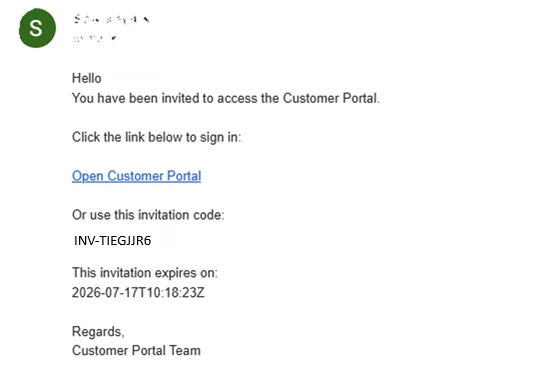
3. Customer clicks the invitation link
The customer receives the email and clicks through to the portal. The link carries the invitation code as a parameter. When the customer lands on the Invitation Redemption page, the code is pre-populated — no manual copy and paste.
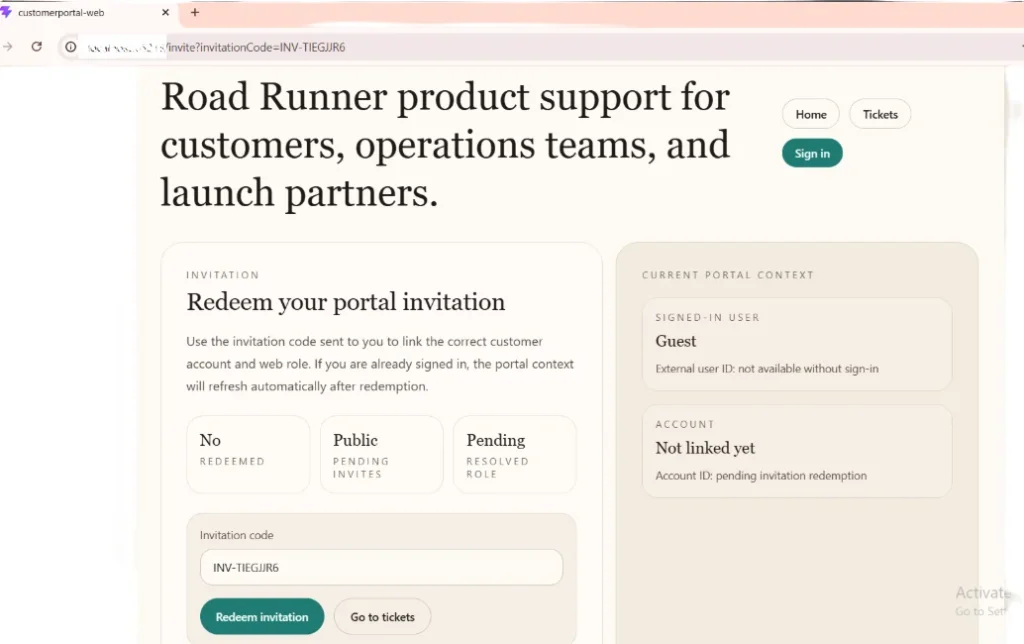
4. Customer signs in with Microsoft Entra External ID
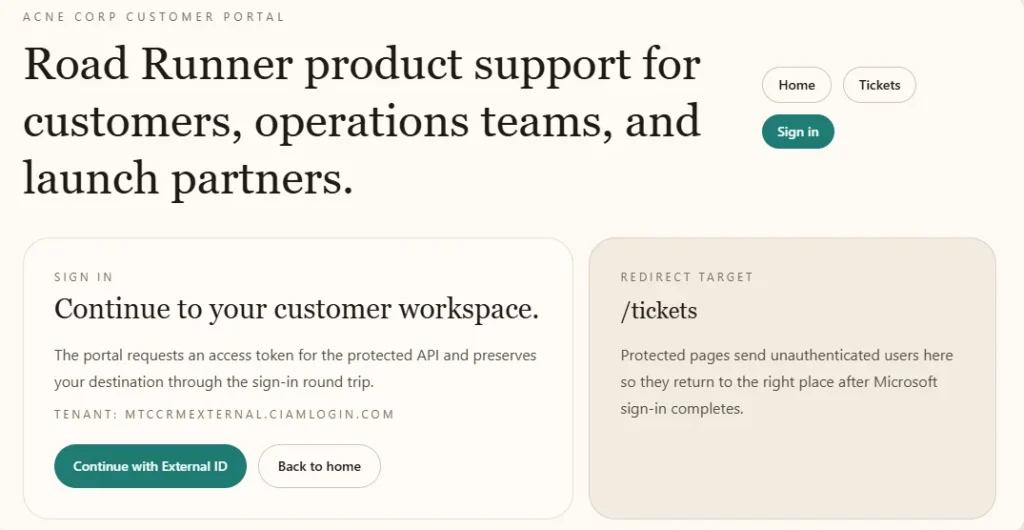
After redeeming the invitation, the customer is redirected to Microsoft Entra External ID to complete the sign-up. Entra handles the identity work — production-grade multi-factor authentication, password recovery, session management, standards-compliant tokens.
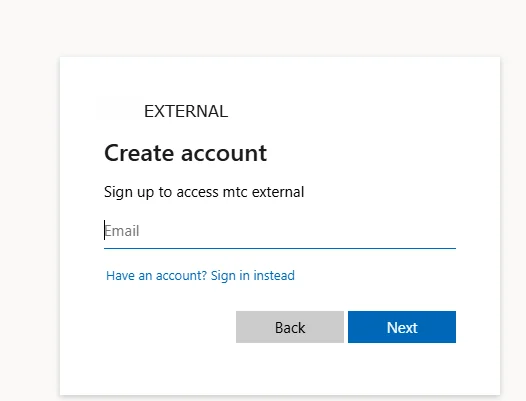
5. Customer enters their email
Entra External ID prompts the customer to enter their email address. This is the identity the customer will use to sign into the portal from now on.
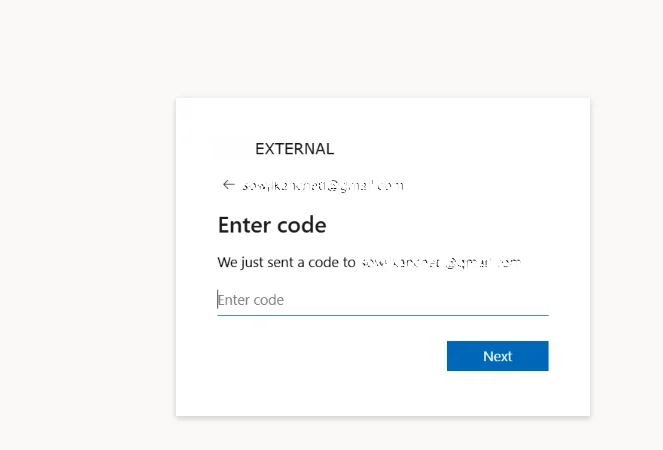
6. Email verification via one-time code
Entra sends a one-time verification code to the customer’s inbox. The customer enters the code on the next screen. Email ownership confirmed.
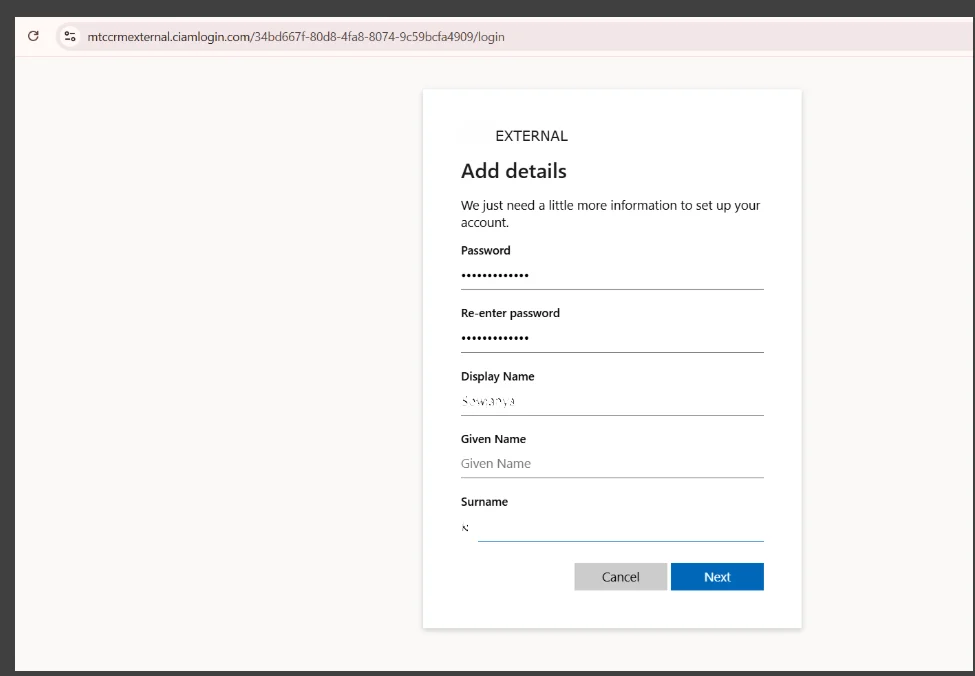
7. Customer completes their profile
The customer fills in the remaining sign-up details — display name, any other required attributes. Entra External ID stores these as user attributes on the identity.
8. Account is created and linked to the Contact
Once the sign-up completes, the new Entra External ID user is automatically linked to the corresponding Contact record in Dataverse — the invitation code that was redeemed carries the link. The customer lands on the portal home page where they can see their cases, invoices, and any other data they are entitled to view.
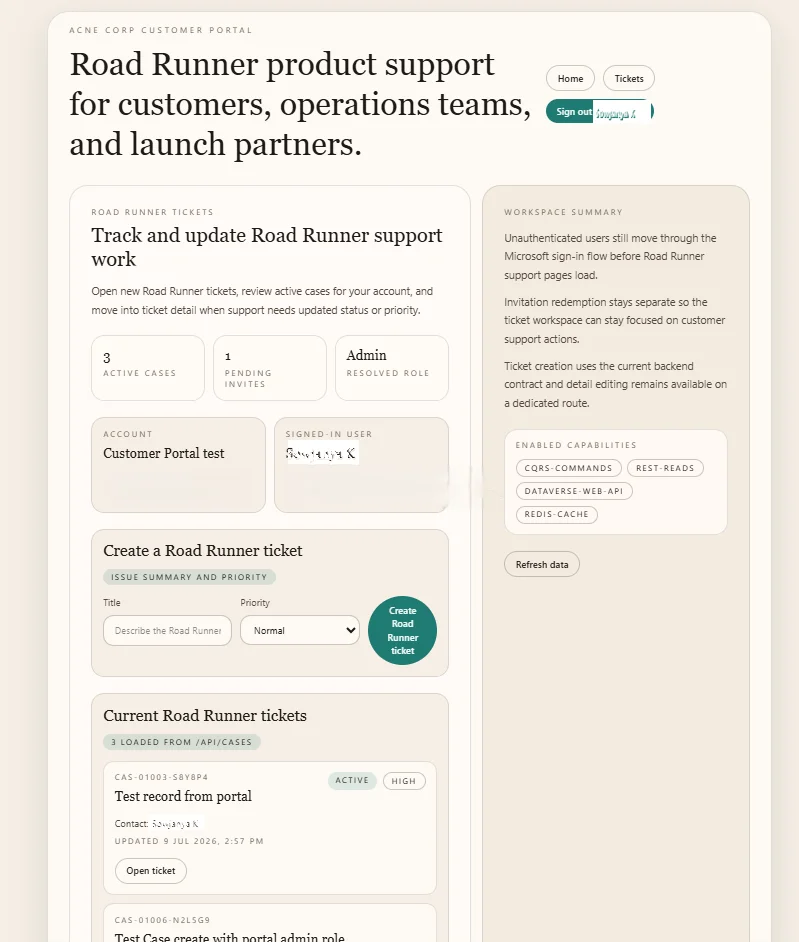
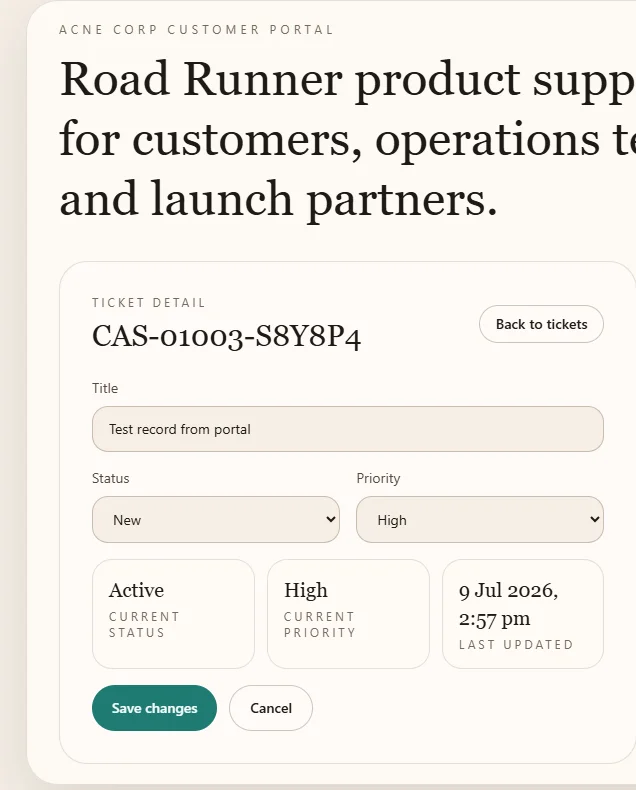
9. Customer creates and manages support tickets
From the portal, the customer can create new support tickets, view existing ones, and drill into ticket details. Each Case created from the portal is written to Dataverse against the customer’s Contact record, so the account manager sees it inside Dynamics 365 immediately.
Security applied at every layer
Three layers of security, not one.
Identity layer — Microsoft Entra External ID. Multi-factor authentication, conditional access, standards-compliant OAuth 2.0 / OpenID Connect tokens. No usernames and passwords stored in Dataverse. No local authentication logic to maintain.
Application layer — Azure App Service. The React portal validates every incoming Entra token before it runs any query. Web Application Firewall in front of the App Service. HTTPS enforced, security headers configured, CORS locked to expected origins.
Data layer — Dataverse. Every Dataverse Web API call carries the authenticated user context. Per-user data scoping is enforced on the backend — a customer signed in with Contact ID A can query only records belonging to Contact ID A, regardless of what the browser tries to send. This is the same authorisation discipline we cover for Power Pages in our Power Pages Security guide, applied to a custom portal instead of a low-code one.
Where this pattern fits — and where Power Pages fits instead
The pattern is not universally the right answer.
This custom pattern fits when:
- The customer base will scale past roughly 500–1,000 authenticated users
- The customer experience needs to feel like a modern web app rather than a template-driven portal
- Per-login licensing on Power Pages would compound faster than App Service hosting cost
- The portal needs to integrate deeply with non-Microsoft services or bring specific front-end libraries
- The client wants a purpose-built portal delivered by a partner rather than a low-code template
Power Pages fits when:
- The user base is small to mid-sized (under a few hundred authenticated users)
- The portal scenario is standard — forms, lists, cases, straightforward workflows
- Time to market matters more than long-term UX flexibility
- The team’s centre of gravity is Power Platform, not React
See our detailed Power Pages vs Custom React Portal decision framework for the full trade-off view. Our B2B portal service page covers the broader B2B portal capability MTC delivers across both patterns.
Common variations we deliver
The 9-step flow above is the core. Real client deployments almost always add:
- Multi-language support for portals serving customers across regions. Entra External ID handles the identity strings; React handles the UI strings with i18next or similar.
- Social sign-in as an alternative to email-and-password. LinkedIn, Google, or Microsoft as identity providers alongside email.
- Invoice viewing and payment integrated with Business Central online. See our Move Dynamics 365 Attachments to SharePoint Automatically guide for the storage pattern we use for invoice PDFs.
- Knowledge article search for self-service, reducing case volume.
- Custom entity access — supplier records, product catalogues, order history, warranty records — whatever the client’s business model needs.
- Signature capture using the same pattern our CRM Picture add-on uses on Field Service work orders.
Every variation reuses the same identity + data + workflow foundation. The React front-end is where the client-specific work happens.
Frequently Asked Questions
Why Microsoft Entra External ID and not Azure AD B2C?
Microsoft Entra External ID is the current name for what used to be Azure AD External Identities plus B2C. Microsoft has been consolidating the identity story on External ID as the go-forward product. New builds should target External ID. If you have an existing portal on B2C, migration is straightforward but does need planning.
Does this pattern require Power Pages licences?
No. The portal itself is a custom React app on Azure App Service. Power Pages licences are only relevant if you also run a Power Pages site. The cost model here is App Service hosting for the portal plus Entra External ID per-active-user pricing, plus Dataverse capacity for the data.
How is per-user data scoping enforced?
On the backend, not the front-end. Every Dataverse Web API call from the React portal is authenticated with the signed-in user’s Entra token. The Azure App Service backend maps the token to the Contact record via the invitation link established at sign-up, then only queries records associated with that Contact. The front-end cannot bypass this by manipulating URLs or requests — the backend enforces the filter.
How long does a build like this take?
For a mid-complexity B2B customer portal — invitation flow, sign-up, case management, entitlements, knowledge articles — expect eight to twelve weeks from scoping to production. Simpler portals go faster. Portals with heavy custom entities or unusual integrations take longer.
Can existing Power Pages customers migrate to this pattern?
Yes. The Dataverse data model usually carries across cleanly. What changes is the front-end and the authentication provider. See our Microsoft legacy portal deprecations 2026 guide for the context on Microsoft’s portal roadmap — the deprecations affect older portal platforms, not Power Pages itself, but the same planning discipline applies when moving off a portal for any reason.
Conclusion
A well-built B2B customer portal on Microsoft is not one product. It is three products doing their jobs well — Entra External ID for identity, Dataverse for data, Power Automate for lifecycle — with a custom front-end sitting on top. This is a working example MTC has built and can demonstrate for B2B customer bases that need production-grade auth, scalable cost, and a modern user experience. For lower-volume or standard-workflow portals, Power Pages is still the fastest path.
Interested in seeing this build in action or having something similar delivered for your organisation? MTC can demonstrate the portal walkthrough on a discovery call and scope a delivery to your specific requirements. Explore our B2B portal for Microsoft Dynamics 365 services, see the Power Pages vs Custom Portal decision framework, or email salesteam@mtccrm.com to arrange a demo.