Microsoft Power Pages pricing confuses almost everyone the first time they look at it. The Microsoft pricing page is precise but dense, and the model is different from anything else in the Microsoft Cloud stack — capacity packs per website per month, separate pricing for authenticated and anonymous users, and Dataverse capacity that pools at the tenant level but capacity packs that don’t.
For organisations evaluating Power Pages, the cost confusion is a real blocker. For Microsoft partners, explaining the pricing to clients is one of the most common pre-sales questions they get.
This guide breaks down Power Pages pricing for 2026 — the actual model, what each licence covers, real-world cost scenarios at small, mid, and enterprise scale, and the hidden costs that don’t appear on the Microsoft pricing page. If you’re new to Power Pages overall, start with what is Microsoft Power Pages and come back here.
The Power Pages Pricing Model — Simplified
Microsoft Power Pages uses a capacity-based pricing model with two separate tracks:
| Plan | Price | What You Get |
|---|---|---|
| Free trial | Free for 30 days | Full feature access, branded sites, templates, Dataverse connection — 2 GB database, 16 GB file capacity |
| Authenticated users | $200 per 100 users / site / month, paid yearly | Sign-in users via Entra ID, B2C, Google, LinkedIn, or custom OpenID — 2 GB database + 16 GB file capacity per subscription |
| Anonymous users | $75 per 500 users / site / month, paid yearly | Public visitors, no sign-in — 500 MB database + 4 GB file capacity per subscription |
Three important facts most teams miss the first time they read this:
- Pricing is per website per calendar month — a user accessing two Power Pages sites in the same month consumes capacity in both
- Capacity packs are sold in fixed blocks — 100 authenticated users or 500 anonymous users at a time, not per individual user
- Capacity is environment-level, not user-assigned — easier to administer than per-seat licensing but harder to plan if user counts fluctuate
Real-World Cost Scenarios
The pricing model only makes sense when applied to real scenarios. Three common ones:
Scenario 1 — Small Customer Portal (200 authenticated users)
A clinic, small association, or boutique partner portal with ~200 authenticated users.
- Capacity needed: 200 users → 2 capacity packs (each pack covers 100 users)
- Cost: 2 × $200 = $400 per month
- Annual: $4,800
- Plus: standard Dataverse storage (usually within the included 2 GB)
For an organisation already on Microsoft 365 with a real business reason for a portal, this is a workable cost. For a single clinician or sole proprietor practice, it can feel high — alternative architectures may fit better.
Scenario 2 — Mid-Scale Partner Portal (2,000 authenticated users)
A regional distributor network, mid-size partner portal, or enterprise customer service portal.
- Capacity needed: 2,000 users → 20 capacity packs
- Cost: 20 × $200 = $4,000 per month
- Annual: $48,000
- Plus: likely additional Dataverse storage capacity
At this scale, Power Pages is significantly cheaper than the all-in cost of a custom-hosted portal (development, hosting, security patching, CDN, support) — but only after the initial build cost is factored in.
Scenario 3 — Enterprise Public Portal (50,000 anonymous + 5,000 authenticated)
A government citizen service portal, public university enrolment portal, or large customer self-service deployment.
- Anonymous: 50,000 users → 100 packs × $75 = $7,500 per month
- Authenticated: 5,000 users → 50 packs × $200 = $10,000 per month
- Total: $17,500 per month ($210,000 per year)
- Plus: Dataverse storage, possible Stream/video storage, additional add-ons
At this scale, Power Pages remains cost-effective because the alternative — building, hosting, securing, and maintaining a custom platform that handles enterprise authentication and 50,000+ concurrent users — would cost significantly more.
What’s Included in the Power Pages Licence
Three things Microsoft includes in Power Pages capacity that are often overlooked:
Content Delivery Network (CDN)
Power Pages includes a Microsoft-managed CDN for global performance. No need to provision Azure Front Door or Cloudflare separately for standard portal performance needs.
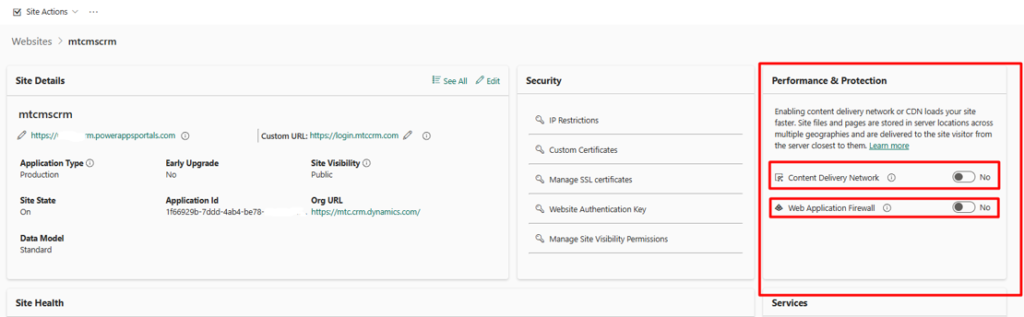
To configure CDN settings:
- Open the Power Platform Admin Center
- Select Environments and choose the environment containing the Power Pages site
- Navigate to Resources → Power Pages sites
- Select the site and click Manage
- Open Performance & Protection
- CDN and WAF options appear here
Web Application Firewall (WAF)
Available in the same Performance & Protection panel. Microsoft-managed WAF protects against common attack patterns (SQL injection, XSS, bot traffic) without extra configuration.
Native Dataverse Integration
Forms, lists, data grids — all included natively. No connector licensing needed. Web roles and table permissions handle row-level security at no extra cost.
Server Logic Runtime
Power Pages server logic, which went GA in April 2026, is included in the capacity. Server-side JavaScript for secure API calls without provisioning Azure Functions separately.
Standard Authentication Providers
Microsoft Entra ID, Entra External ID (B2C), LinkedIn, Google, Microsoft, and custom OpenID Connect providers — all included. Custom auth provider integration is supported without additional licensing.
License Assignment for Power Pages
For partners and tenant administrators, license assignment is straightforward but has a few catches worth knowing.
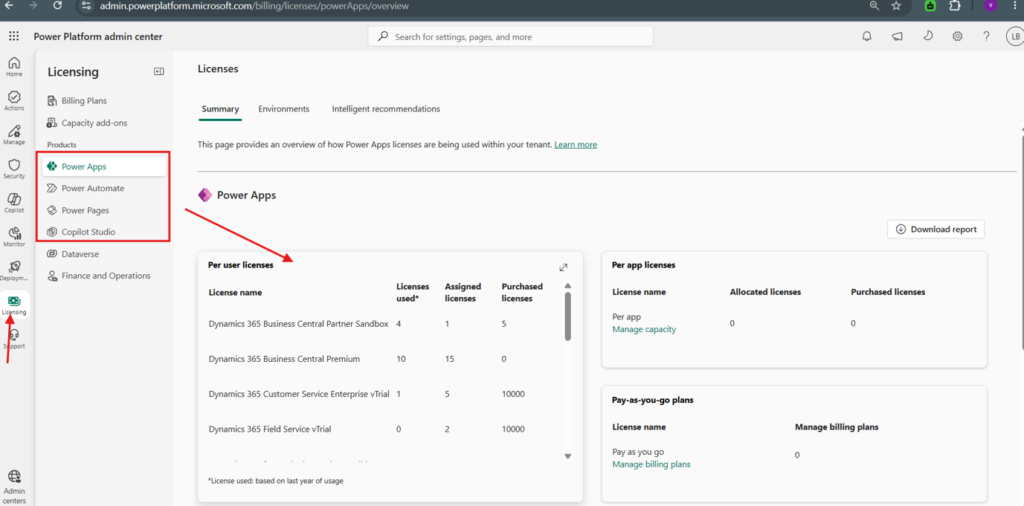
To assign capacity:
- Open the Power Platform Admin Center
- Navigate to Resources → Capacity
- Capacity packs purchased at the tenant level appear here
- Assign packs to specific environments — this is where the 100 authenticated or 500 anonymous user blocks get allocated
Three important rules:
- Capacity packs are tenant-level when purchased but environment-level when assigned. You can shift capacity between environments mid-month.
- Authenticated and anonymous capacity is tracked separately — if your portal has both types of users, you need both pack types.
- The first capacity pack is required before the site moves out of trial mode and goes to production.
Starting with the Power Pages Trial
For organisations evaluating Power Pages, Microsoft includes a 30-day free trial with full feature access.
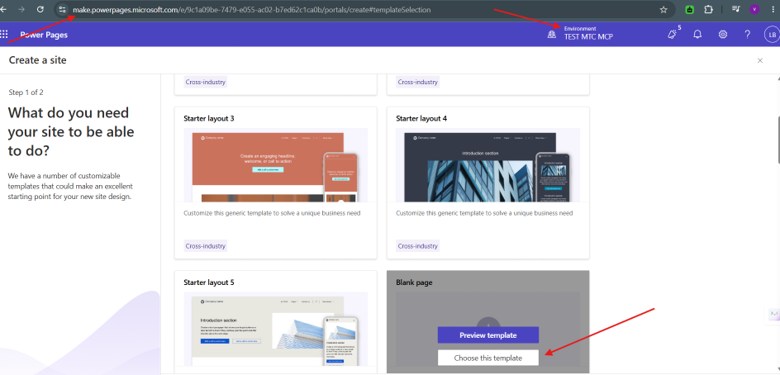
Starting the trial:
- Sign in to Microsoft Power Pages (make.powerpages.microsoft.com)
- Click Create a site
- Choose a template (Customer Portal, Partner Portal, Service Request, or blank)
- The trial environment is provisioned with 2 GB database + 16 GB file capacity
- Trial includes branded customisation, Dataverse connection, authentication setup, and full design studio access
The trial converts to a paid capacity pack at the end of 30 days — at which point you need at least one authenticated or anonymous capacity pack to keep the site live.
Hidden Costs and Gotchas
The Microsoft pricing page covers the licence cost, but real-world Power Pages deployments include additional cost lines that catch first-time buyers off guard.
Additional Dataverse Storage
The included 2 GB database is enough for most starter portals, but enterprise portals storing case data, document metadata, or audit logs often exceed it. Additional Dataverse storage is billed separately at the tenant level — $9.60 per GB per month for database, much lower for file storage.
Per-Site Cost Multiplication
A common misconception: “I’ll just run multiple sites in one environment to share capacity.” Power Pages capacity is per site, not per environment. Three sites with 100 users each cost three separate capacity packs.
Custom Domain SSL
Mapping a custom domain to a Power Pages site (e.g. portal.yourcompany.com) is included, but the SSL certificate management requires using Microsoft-managed certificates or bringing your own. BYO certificates have configuration complexity that often gets billed as professional services.
Microsoft Stream Storage
If embedding videos via Microsoft Stream (a common Power Pages pattern), Stream storage consumes SharePoint Online storage at the tenant level. For video-heavy portals, this can become a material cost.
Pro-Code Add-Ons
When the build needs custom pro-code work (Power Pages server logic, custom Liquid templates, JavaScript SPA mode, integration with external services), MTC and other partners deliver these as professional services. They’re not licence costs but they affect total cost of ownership.
Comparing Power Pages Costs to Alternatives
For organisations evaluating “should we use Power Pages or something else,” the honest answer depends on scale.
| Scenario | Power Pages | Alternative (React + Azure Static Web Apps + Entra ID External ID) |
|---|---|---|
| Small (100 users) | $200/month | $50–100/month |
| Mid-scale (1,000 users) | $2,000/month | $200–400/month |
| Enterprise (10,000 users) | $20,000/month | $1,000–3,000/month |
Why Power Pages still wins at enterprise scale despite higher licence cost:
- No custom hosting overhead — Microsoft-managed runtime, CDN, WAF, scaling all included
- Native Dataverse integration — building custom Dataverse access is non-trivial in a React stack
- Faster build — low-code design studio + templates accelerate delivery
- Microsoft enterprise support — single throat to choke for the portal stack
- Lower long-term maintenance — security patching, framework updates, infrastructure management all handled
Why alternatives win at small scale:
- Significantly cheaper for sites under 500 users
- No per-user economics — anonymous public access via Entra ID External ID is much cheaper at scale
- Full custom UI — though Power Pages SPA mode now closes this gap
- Lower lock-in — direct Azure services rather than Power Pages-managed runtime
The break-even is usually around 500–1,000 authenticated users. Below that, the alternative architecture is typically cheaper. Above that, Power Pages becomes more cost-effective.
When Power Pages Pricing Makes Sense
Power Pages is the right cost answer when
- The organisation already runs on Microsoft 365 + Dynamics 365
- The portal needs native Dataverse integration with role-based access
- Total users will exceed 500 authenticated (the break-even threshold)
- Microsoft-managed hosting, CDN, security patching are valuable to the organisation
- The portal needs to ship in weeks, not months
- AI and Copilot integration are in the roadmap
Power Pages is the wrong cost answer when
- Total users will stay under 200 authenticated long-term
- The site is primarily marketing content with no Dataverse interaction
- Public anonymous traffic exceeds 100,000 users without high-value commercial purpose
- The organisation is not on Microsoft (the value collapses without Dataverse and Entra ID)
How MTC Helps Partners with Power Pages Pricing Conversations
The pricing model is the most common pre-sales question MTC’s Power Pages partner team helps clients answer. Most partners can build Power Pages portals technically. Fewer partners can explain the licensing math to a CFO without losing the deal on cost.
What MTC delivers on the pricing conversation:
- Capacity sizing exercise — projecting authenticated and anonymous user counts over 3 years
- Cost-per-user benchmark — Power Pages vs alternative architectures at the client’s specific scale
- TCO breakdown — licence + Dataverse + storage + professional services + ongoing support
- Roadmap-aware capacity planning — phased buildouts that match capacity purchases to actual user growth
- Alternative architecture proposal — when Power Pages is genuinely the wrong fit, we say so and propose Azure-hosted alternatives
Honesty in the pricing conversation wins the long-term partnership — and protects the partner’s credibility with their client.
Conclusion
Microsoft Power Pages pricing is precise but unintuitive on first look. The capacity-pack model rewards scale — break-even versus alternative architectures sits around 500–1,000 authenticated users, above which Power Pages is the cost-effective choice for any organisation already on the Microsoft stack.
For decision-makers evaluating Power Pages, the math works almost every time the use case fits — Dataverse integration, role-based access, Microsoft-managed hosting. For organisations whose use case doesn’t fit, the honest answer is to consider alternatives — and a partner who tells you that is a partner worth keeping.
Need a development-first Microsoft Power Pages partner to help size, scope, or build your next portal? Talk to MTC’s Power Pages team — 80+ Microsoft consultants in Hyderabad, 25+ AppSource add-ons live, white-label delivery for Microsoft partners worldwide.