If you work with Dynamics 365, you know how important visual information can be. A field technician may need to capture the condition of equipment, a sales team may want to maintain customer or product images, or a service team may need to record proof of work completed.
However, managing images and videos directly within Dynamics 365 is not always simple. Uploading files can feel disconnected from the record, large media files can consume valuable Dataverse storage, and users often need more flexibility to preview or mark up images before sharing them.
That is why we built CRM Picture Pro — a simple, flexible Dynamics 365 add-on that helps users capture, upload, preview, annotate, and manage images and videos directly from CRM records.
Why We Built CRM Picture Pro
Visual documentation is becoming a natural part of daily CRM usage. Teams often ask:
- Can I capture a photo or video directly from a Dynamics 365 record?
- Can I upload multiple files quickly instead of handling them one by one?
- Can I avoid storing large images and videos directly in Dataverse?
- Can I preview uploaded media without downloading it?
- Can I highlight or mark up an image and save the edited copy?
CRM Picture Pro was designed to solve these practical needs without adding complexity to the user experience.
What You Can Do with CRM Picture Pro
CRM Picture Pro brings media management directly into Dynamics 365, making it easier for users to work with images and videos in the context of the record they are already using.
Capture Photos and Videos
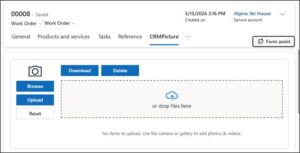
Users can capture images and videos directly from the device camera, making it convenient for on-site visits, inspections, service jobs, and field documentation.
Upload Multiple Images and Videos
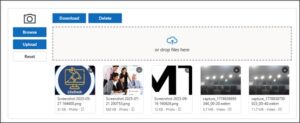
Users can upload media files from their device and associate them with Dynamics 365 records such as Accounts, Contacts, Work Orders, Opportunities, or custom tables. Multiple files can be selected and uploaded at once — no more one-at-a-time uploads.
Save Dynamics Storage with SharePoint Integration
Instead of storing heavy media files entirely within Dynamics 365, CRM Picture Pro pushes images and videos to SharePoint. A SharePoint URL is stored against the CRM record, helping organisations reduce Dataverse storage usage while keeping media linked to the right record.

Preview Uploaded Images and Videos from the Gallery
Once uploaded, users can view images and videos directly from the CRM Picture Pro gallery. This makes it easy to review media without opening separate systems or downloading files.

Annotate Images and Save Edited Copies
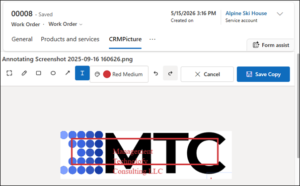
CRM Picture Pro includes an annotation feature, allowing users to make edits or markups directly on an image. The edited version is saved as a new image in the gallery and is also pushed to SharePoint — ensuring both the original and revised files are retained.
Works Across System and Custom Tables
CRM Picture Pro can be configured on standard Dynamics 365 tables as well as custom Dataverse tables, making it adaptable across different business processes and industries.
How It Works in Everyday Use
The experience is designed to stay simple:
- Open the relevant Dynamics 365 record
- Capture a new photo or video, or upload files from the device
- Save the media and access it from the gallery
- Preview uploaded images or videos whenever needed
- Annotate an image if required and save the edited copy
- CRM Picture Pro stores the media in SharePoint while keeping the reference available within Dynamics 365
The result is a smoother and more organised way to work with visual information inside CRM.
Where CRM Picture Pro Adds Value
CRM Picture Pro is useful wherever images and videos support better documentation, faster review, or stronger proof of work.
Field Service
Technicians can capture site conditions, equipment issues, completed repairs, and short videos directly against Work Orders or Assets — building a visual audit trail without leaving the Dynamics 365 record.
Sales and Account Management
Teams can maintain customer site images, product visuals, profile photos, or other record-specific media directly on Account, Contact, or Opportunity records.
Inspection and Quality Teams
Users can capture evidence, annotate defects or observations, and save the edited version for follow-up — all within the context of the relevant Dynamics 365 record.
Operations and Support Teams
Organisations can keep visual records organised while avoiding unnecessary storage growth inside Dynamics 365 — using SharePoint as the storage layer without disrupting the user experience.
Why CRM Picture Pro Stands Out
CRM Picture Pro is more than a basic image uploader. It is a practical media management solution built for Dynamics 365 users who need:
| Capability | What It Means for Users |
|---|---|
| Photo & video capture | Capture directly from the device camera on any record |
| Multiple media uploads | Upload a batch of files in a single action |
| SharePoint storage | Reduce Dataverse usage by keeping heavy files in SharePoint |
| Gallery preview | View images and videos inline without downloading |
| Image annotation | Mark up images and save the edited copy alongside the original |
| Standard & custom table support | Works on any Dynamics 365 or Dataverse table |
Make Visual Information Part of Your CRM Workflow
Whether your teams are documenting field work, maintaining visual records, or improving service and inspection processes, CRM Picture Pro helps bring media handling closer to the business record where it belongs.
With support for images, videos, SharePoint storage, gallery preview, and annotation, CRM Picture Pro makes visual documentation in Dynamics 365 more powerful, organised, and storage-efficient.
Want to see CRM Picture Pro in action? Reach out to us for a demo or to learn how it can be configured for your Dynamics 365 environment.