Most sales teams have the same problem: more inbound leads than people to chase them, and a CRM full of records nobody got around to qualifying. The Sales Qualification Agent in Dynamics 365 Sales is Microsoft’s answer — an AI agent that researches leads, evaluates fit, and (in its fuller mode) engages with leads by email so sellers spend their time on the ones most likely to buy. This post explains what the agent does, the two modes it ships in, the concepts it uses to score leads, and what Microsoft partners need to plan for before deploying it.
What you’ll learn:
- What the Sales Qualification Agent is and the problem it solves
- The two modes: Research-only vs Research and engage
- Key concepts: target customer profile, BANT, and purchase interest
- Three real sales-team problems the agent solves
- What Gartner and industry analysts say about AI in sales
- Prerequisites, capacity, and Responsible AI considerations
- Where it fits for Microsoft partners
What the agent actually does
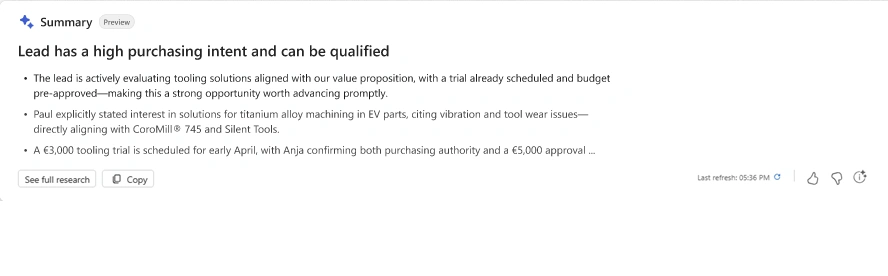
The Sales Qualification Agent is built on Microsoft Copilot Studio and runs inside Dynamics 365 Sales. It works on the leads you assign to it — filtered by criteria like lead source, rating, or geography — and:
- Researches each lead’s background, recent activity, and the company they work for
- Compares them against your target customer profile to score fit
- Drafts an initial outreach email
- Hands promising leads to sellers, and notifies supervisors about the rest
It is positioned as a productivity tool, not a replacement for seller judgement. The agent surfaces what it found and why; the human still decides.
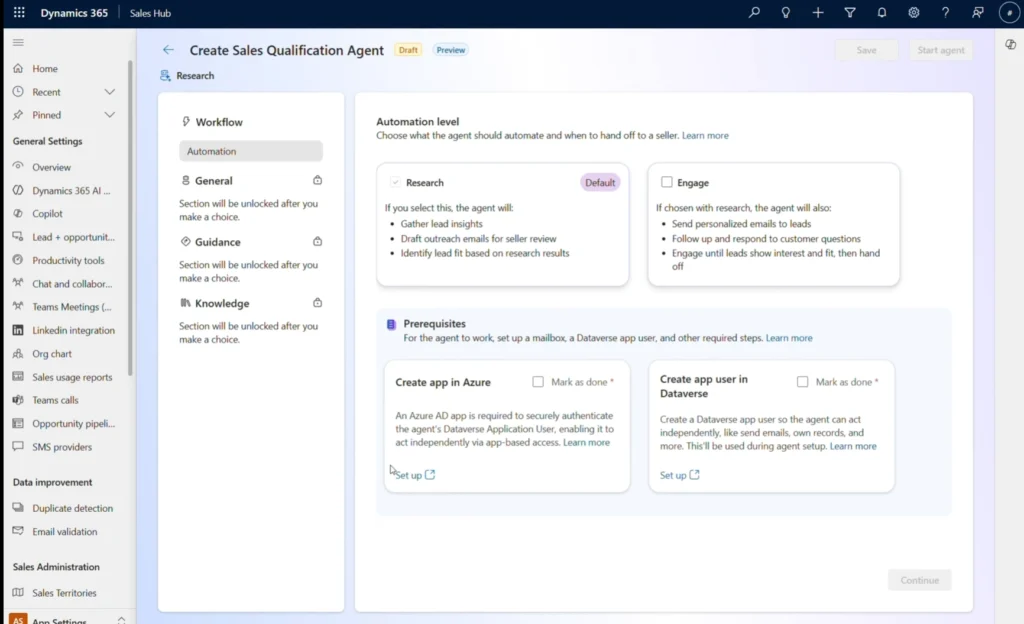
The two modes: Research-only vs Research and engage
There are two deployment modes and you pick one — they cannot run together in the same environment.
Research-only mode automates the research half. The agent reviews assigned leads, scores them against your target customer profile, and produces a draft outreach email for the high-fit ones. Sellers send the email and take it from there. Lower-touch, easier to roll out, and a sensible starting point if your team wants AI assistance without giving the agent control of outbound communication.
Research and engage mode goes further. The agent sends the outreach email itself, reads replies, gauges purchase intent, sends follow-ups and clarifying questions, and only hands a lead to a seller once it has evidence of intent and a reasonable fit on your hand-off criteria. Anything that doesn’t qualify is disqualified and the supervisor is notified. Higher leverage — but it also means an AI is having real conversations with your prospects, so it needs careful configuration.
Side-by-side: what each mode does
| Capability | Research-only | Research and engage |
|---|---|---|
| Research leads | Yes | Yes |
| Check target customer profile criteria | Yes | Yes |
| Check BANT criteria | No | Yes |
| Generate outreach emails | Yes | Yes |
| Send outreach emails | No | Yes |
| Detect positive intent from replies | No | Yes |
| Send follow-ups and clarifying questions | No | Yes |
| Hand promising leads to sellers | Yes | Yes |
| Notify supervisors about disqualified leads | Yes | Yes |
The concepts the agent uses
Three concepts drive the agent’s scoring. Two apply in both modes; one is exclusive to Research and engage.
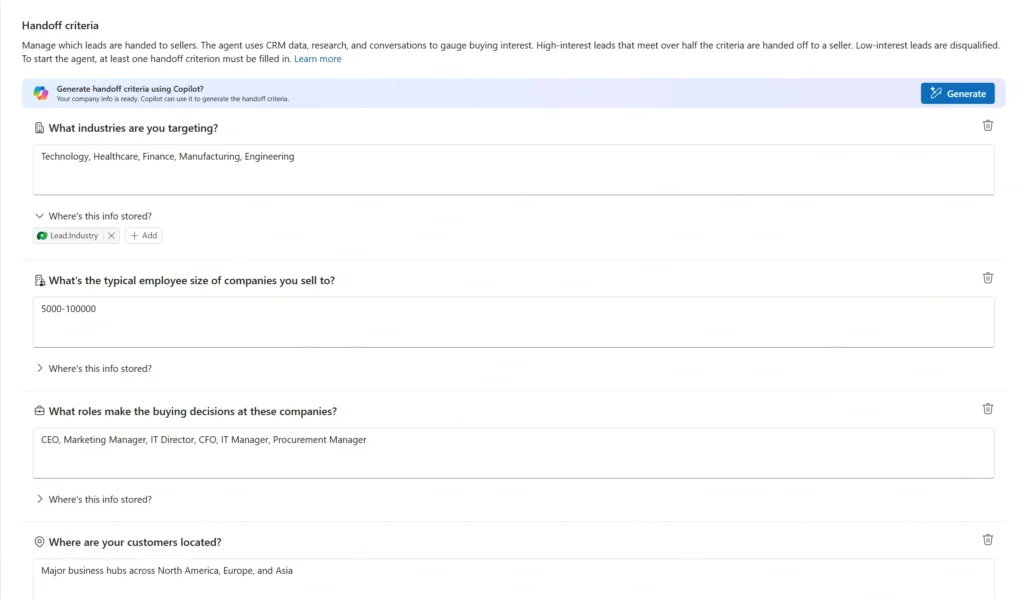
Target customer profile (both modes)
This is your description of an ideal customer — industry, company size, lead job title, location, annual revenue. The agent uses this profile to bucket leads into three categories:
- High fit — matches more than 70% of the profile attributes
- Moderate fit — matches 50% to 70%
- Low fit — matches less than 50%
The bands are deliberately blunt, which makes them easy to act on: high-fit leads get worked first, moderate-fit go in the second wave, low-fit get parked or disqualified. The quality of these scores depends entirely on how sharply you define the profile in the first place.
BANT — Budget, Authority, Need, Timeline (engage mode only)
The classic qualification framework. The agent uses email conversations to test each one — does the lead have budget, are they the decision-maker, is there a real need, and what is the timeline? BANT is what tips a “researched” lead into a “ready for a seller” lead in engage mode.
Purchase interest (engage mode only)
The agent reads the language in replies and rates intent as positive or negative, then high, medium, or low. A lead asking for pricing for the enterprise plan and saying budget is being finalised this week reads as high positive intent. A lead asking if there’s a general pricing page they can check reads as low. A lead saying budget isn’t there and it isn’t a priority reads as high negative intent — and gets disqualified. This signal feeds directly into the hand-off decision.
What to plan for before deploying
This is an enterprise-grade agent and the setup reflects that. Microsoft’s published prerequisites include:
- A Copilot Studio licence
- The modern UI turned on for the Sales Hub app
- Server-side synchronization with Exchange — without it, the agent cannot send or read email, so engage mode is impossible
- In-app notifications enabled, so sellers and supervisors actually see hand-offs
- Data policies updated to allow the connectors the agent needs — Copilot Studio, Dataverse, the public web knowledge source, and (optionally) SharePoint or OneDrive for internal document enrichment
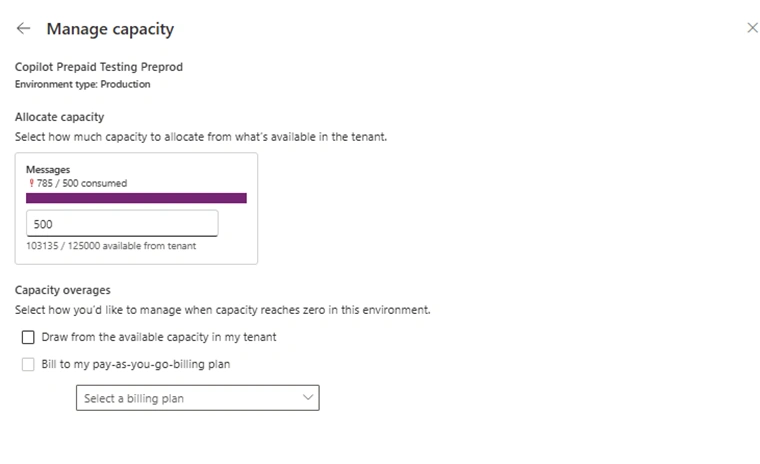
On top of that you decide capacity: the agent consumes tenant capacity per lead processed, and Microsoft supports either prepaid or pay-as-you-go billing. Modelling expected lead volume against capacity cost is a non-trivial part of the rollout decision.
Microsoft also publishes Responsible AI FAQs for both modes — worth reading with your compliance team before engage mode goes live, especially because the agent will be sending real email to real prospects.
Problems the Sales Qualification Agent solves
The agent’s value is easiest to see by mapping it against the real problems sales leaders deal with every quarter. Three are worth calling out.
Problem 1: Lead volume outruns sales capacity
Inbound from the website, events, webinars, and campaigns piles up faster than the team can work it. Leads sit untouched in the CRM, the freshest ones go cold, and sellers default to whatever is in front of them rather than what is actually most promising.
How the agent solves it: the agent works through assigned leads continuously, researches each one, and ranks them against the target customer profile. Sellers open their day to a ranked queue of high-fit, researched leads instead of an undifferentiated pile — and in engage mode, low-fit leads are disqualified automatically so they stop occupying mental space.
Problem 2: Onboarding new sellers is slow and inconsistent
New hires take weeks to learn how the company defines an ideal customer, what “good” research looks like, and how to write a first email that lands. Until they get there, output is uneven and the ramp depends on senior sellers having time to coach.
How the agent solves it: the target customer profile is configured once, centrally, and the agent applies it the same way for every seller. New joiners get pre-researched leads with the company’s ICP logic already applied, plus a drafted outreach email written in the agreed tone. They learn by reviewing and editing real examples, not by guessing — which compresses ramp time and takes pressure off senior sellers.
Problem 3: First-touch outreach is generic and slow
Personalised first emails take time. Most sellers either write fast and generic, or write well and slow — and the conversion difference between the two is significant. Templates help, but they still need real research behind them to feel personal.
How the agent solves it: the agent drafts an outreach email per lead, grounded in the research it just did on the company and the contact. Sellers review, tweak, and send — the heavy lifting is done. In engage mode, the agent also handles the follow-up cadence, sending clarifying questions and reading replies for purchase intent so sellers only step in once a lead is genuinely warm.
Where this fits for Microsoft partners
For partners working with D365 Sales clients, the Sales Qualification Agent is one of the strongest “AI you can actually deploy this quarter” stories on the platform. The build work sits in three places: defining a target customer profile sharp enough to score against, configuring the agent in Copilot Studio against the client’s sales process, and wiring up the supporting plumbing — Exchange sync, notifications, capacity, data policies. It pairs naturally with broader Copilot and Dataverse AI work, including custom agents and the Dataverse MCP Server in Visual Studio Code for the dev-side experience.
Frequently Asked Questions
What do industry analysts say about AI in sales?
A May 2026 Gartner survey put a useful number on the value of AI in sales: organisations that provide sellers with AI-enabled next best actions are 2.6 times more likely to achieve commercial growth than those that don’t. That is exactly the category the Sales Qualification Agent sits in — it researches each lead, ranks them against your target customer profile, and (in engage mode) decides which lead to put in front of which seller at which moment. Earlier Gartner work has framed the broader shift: by the end of 2026, 40% of enterprise applications are expected to integrate task-specific AI agents, up from less than 5% in 2025. The Sales Qualification Agent is one of the most visible examples of that integration inside Dynamics 365 Sales.
Won’t AI agents just replace sales reps?
The current analyst position is more nuanced than the “AI replaces sellers” headlines suggest. In November 2025, Gartner forecast that by 2028, AI agents will outnumber human sellers by ten to one — but fewer than 40% of sellers will report that AI agents have actually improved their productivity. Melissa Hilbert, VP Analyst in Gartner’s Sales Practice, framed it as a value ceiling: beyond a certain point, more AI does not mean more productivity; layering extra prompts and tools onto already complex workflows risks overwhelming sellers and accelerating burnout. The implication for the Sales Qualification Agent is practical — pick the mode (Research-only vs Research and engage) that genuinely lifts your team’s output, configure the target customer profile carefully, and resist the temptation to bolt on every available AI feature at once.
Can I run both modes at once?
No. Microsoft’s guidance is that only one mode (Research-only or Research and engage) can be deployed in an environment at a time. Pick the one that matches your team’s appetite for AI-driven outbound.
Does it replace sellers?
No. The agent automates research and (in engage mode) early-stage outreach so sellers focus on qualified opportunities. The seller still owns the conversation from hand-off onward.
What does it cost to run?
The agent uses tenant capacity per lead processed. Microsoft supports prepaid capacity or pay-as-you-go, and provides tooling to monitor consumption. Cost depends on lead volume — that capacity model is part of what you sign off in the deployment plan.
Conclusion
The Sales Qualification Agent is one of the most concrete examples of generative AI inside Dynamics 365 — a real productivity tool with a clear job: get more leads researched, scored, and (optionally) engaged, so sellers spend time on the ones worth pursuing. Pick the mode that matches your risk appetite, take the target customer profile seriously, and plan the prerequisites — Exchange sync, capacity, data policies, Responsible AI — before turning anything on.
Planning an AI agent rollout on Dynamics 365? MTC helps Microsoft partners deploy Copilot Studio agents — including the Sales Qualification Agent — with the configuration, integration, and adoption work that makes them stick. Explore our Azure AI Foundry and Copilot Studio partner services or email salesteam@mtccrm.com.