AT A GLANCE
Industry: Cleaning / facilities services (franchise model)
Platforms: Microsoft Dynamics 365 Customer Service, Power Automate, Business Central (online), React (B2B portal)
Capability: Automated email-to-case routing, region-based queue assignment, franchisee dual portal, automated invoicing in BC, regional surveys
Outcome: End-to-end automated workflow from customer email to invoice, with no manual case routing, faster franchisee turnaround, and a closed feedback loop via surveys
For a cleaning services group operating through a regional franchise model, the day-to-day workflow had real volume — customers emailing service requests, regional offices fielding them, franchisees doing the work, invoices flowing through to head office, surveys closing the loop. Most of it ran on inboxes, spreadsheets, and re-keying. This case study walks through how MTC built an end-to-end automated workflow on Microsoft Dynamics 365 Customer Service, Power Automate, Business Central (online), and a custom React B2B portal for franchisees and regional users.
Client Overview
The client is a cleaning and facilities services group operating across multiple regions through a franchise model. Each region has its own regional office, a defined set of franchisees, and a customer base that mixes commercial contracts and one-off services. The group uses Microsoft Dynamics 365 Customer Service as its system of record for service work, with Business Central running the finance and invoicing function.
The challenge was the gap between those two systems — and between head office, regional offices, franchisees, and customers — which had been filled with email chains, spreadsheets, and a lot of manual administration.
The Business Challenge
The client needed five things to work as one connected flow:
- Customer service requests arrived by email to regional addresses. Each region needed its own routing logic — an email to the Eastern Region inbox is a job for an Eastern Region franchisee, not a head-office triage problem.
- Cases had to land in Dynamics 365 automatically, attached to the right region, with the right priority, and with the original email captured on the case timeline.
- Assignment to the right franchisee had to happen without a dispatcher in the middle. Each region had a defined set of franchisees, and the case needed to go to the right one based on the regional queue.
- Franchisees needed their own working environment — not access to the full Dynamics 365 desktop interface, but a clean, focused portal where they could see their assigned cases, update progress, and close the work.
- Invoices had to flow back to Business Central the moment a job was completed, with the right customer record and the right line items, and a survey had to be sent to the regional office so the group could close the feedback loop.
Out of the box, no single Microsoft product covers all five steps end-to-end. The standard approach is to stitch them together with Power Automate, configuration in Customer Service, and (where the user experience matters) a purpose-built portal — which is exactly what MTC built.
The Solution
The solution has five layers, each handling one segment of the flow.
1. Email-to-case automation with region-based queues
MTC configured mailbox-to-queue routing in Dynamics 365 Customer Service. Each regional email address was associated with a region-specific queue. Inbound emails were automatically converted into cases against the correct queue, with the original email and any attachments captured on the case timeline.
This is configuration-driven, not custom code, which means the client can add new regions over time without rebuilding the flow. The Case Management Agent functionality covered in our Case Management Agent setup guide layers cleanly on top of this same routing model for AI-driven case enrichment.
2. Franchisee assignment from the regional queue
Each regional queue is associated with a defined set of franchisees. MTC built the assignment logic so cases moving into the queue are routed to the appropriate franchisee based on the client’s region-to-franchisee rules (load balancing, skill match, or other criteria as configured). The assignment happens automatically the moment the case is created.
No regional dispatcher in the middle. No spreadsheet of “who has capacity today.” The case lands directly with the franchisee who is going to do the work.
3. React B2B portal — dual purpose
This is the most distinctive piece of the solution. Rather than expose Dynamics 365 directly to franchisees or to regional office users — neither of whom needed (or wanted) the full CRM interface — MTC built a React-based B2B portal that surfaces exactly the data each user needs.
The portal serves two audiences:
- Franchisees sign in and see only the cases assigned to them. They can view case details, update progress notes, mark work as complete, and attach evidence. Each franchisee sees only their own cases — never another franchisee’s data.
- Regional office users sign in to see cases in their region, respond to surveys, and track regional performance. Each regional user sees only their region’s data.
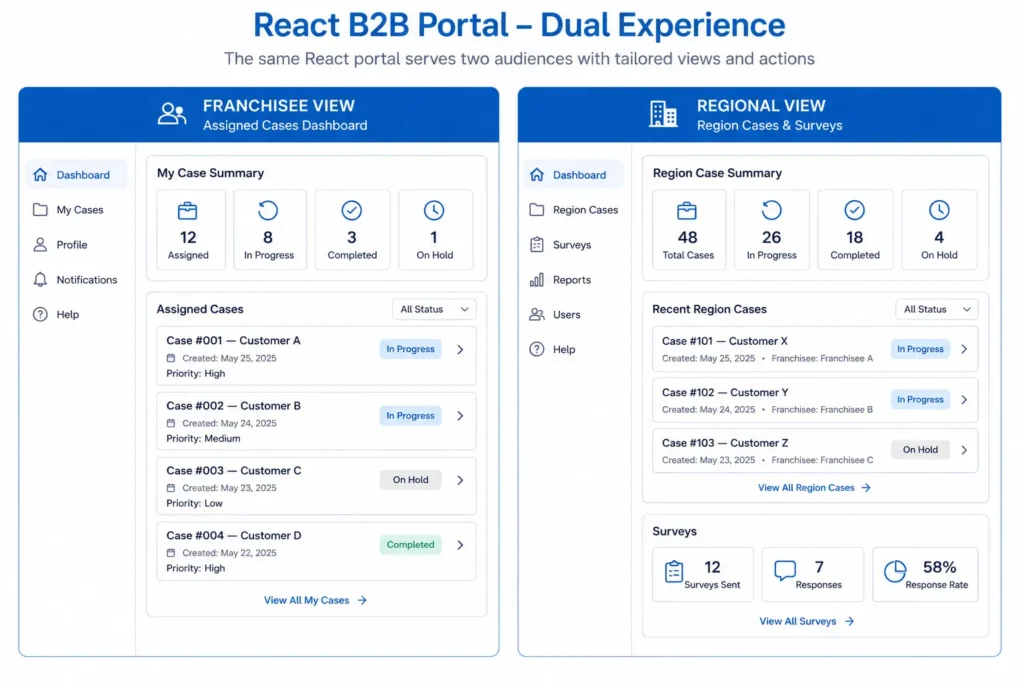
React was the right choice for two reasons: the user experience needed to feel like a modern web app (mobile-friendly, fast, focused), and the security model needed per-user data scoping that worked cleanly with Microsoft Entra ID and the underlying Dataverse permissions. This is the same B2B portal pattern we cover at a higher level in our B2B Portal for Microsoft Dynamics 365 post.
4. Power Automate trigger to Business Central invoicing
When a franchisee marks a case complete in the portal, the case status update in Dynamics 365 fires a Power Automate flow. The flow gathers the case details — customer, services performed, region, line items — and calls Business Central (online) to generate the invoice automatically, attached to the right customer record.
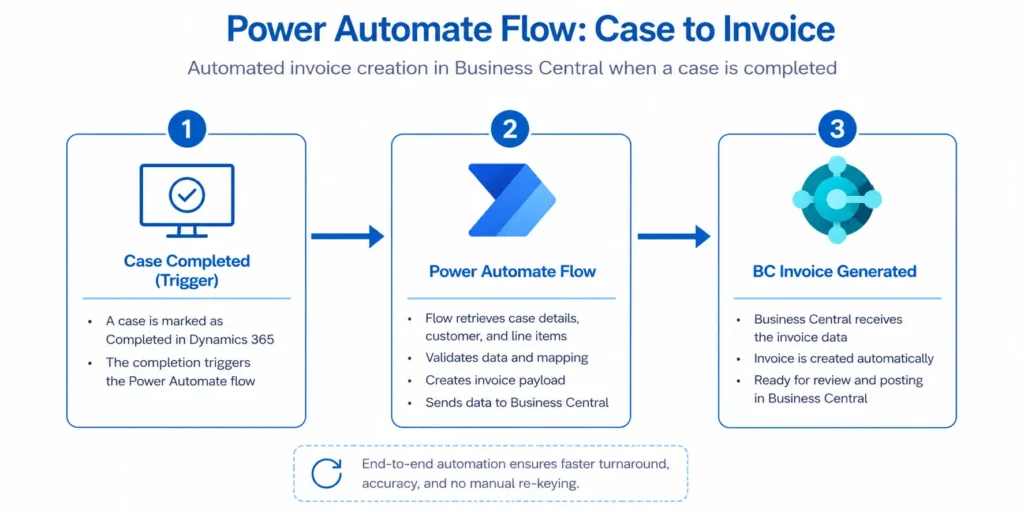
The franchisee finishes the job in the portal. The customer’s invoice appears in Business Central. No re-keying, no daily batch, no delay.
5. Regional survey loop
The same Power Automate flow that triggers the BC invoice also sends a survey to the regional office — closing the feedback loop and giving the group continuous visibility into franchisee performance, customer satisfaction, and regional service quality. Survey responses come back into Dynamics 365 against the originating case, so the data is queryable in context, not stranded in a separate survey tool.
End-to-End Process
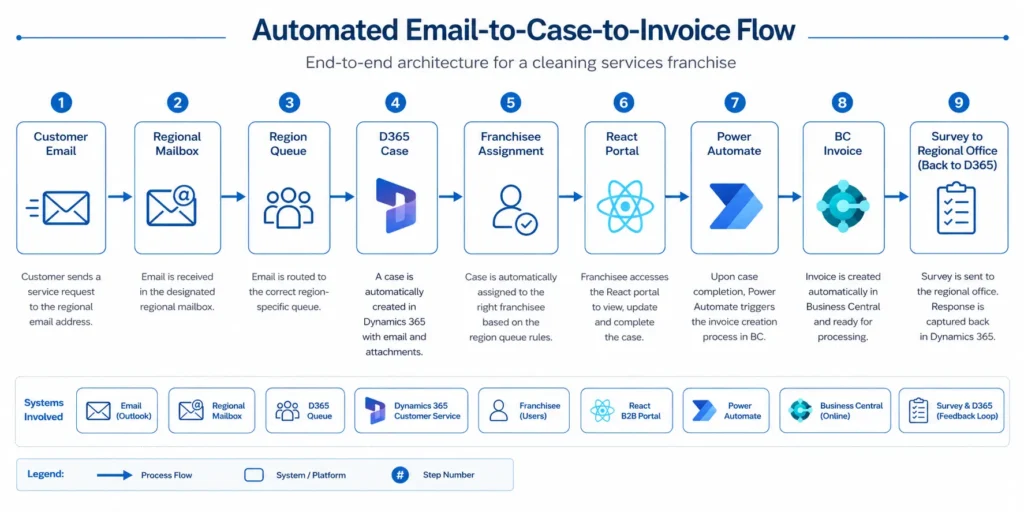
The flow runs in this sequence, with no manual handoffs between systems:
- Customer emails the regional service address with a service request
- Mailbox-to-queue routing captures the email and creates a case in the regional queue
- Automatic assignment sends the case to the appropriate franchisee for that region
- Franchisee receives the case in the React B2B portal, sees the details, does the work, updates progress
- Franchisee marks the work complete in the portal
- Power Automate fires, gathering case details
- Business Central generates the invoice automatically with the correct customer and line items
- Survey sent to regional office to capture feedback
- Survey response flows back into Dynamics 365 against the originating case
What used to be a chain of emails, spreadsheets, and re-keying is now one connected workflow.
Business Benefits
- Zero manual case routing. Cases land with the right franchisee automatically.
- Faster franchisee response. No waiting on a regional dispatcher.
- Clean portal experience. Franchisees and regional users work in an interface designed for them, not the full CRM.
- Per-user data scoping. Each franchisee sees only their cases; each region sees only its data.
- Invoices generated in real time. The moment a job is closed, the invoice is in Business Central.
- Closed feedback loop. Surveys go out automatically; responses are tied back to the originating case.
- Scalable franchise model. Adding a new region or a new franchisee is configuration, not a rebuild.
- Lower administrative overhead. Head office stops chasing paperwork and starts using the data.
Outcome
The cleaning services group now runs one connected workflow from the customer’s first email to the franchisee’s final survey response. Cases land where they need to. Invoices appear where they need to. Surveys close the loop. The systems involved — Dynamics 365 Customer Service, Power Automate, Business Central online, and the React B2B portal — operate as a single coordinated platform from the user’s point of view, even though each is doing its own job under the hood.
The architecture is also designed to grow with the business. New regions, new franchisees, new service categories, additional survey questions — all configuration changes, not rebuilds.
Frequently Asked Questions
Why React for the portal instead of Power Pages?
Both are valid. Power Pages is excellent when the requirement matches the platform — typical B2B/B2C scenarios with standard authentication patterns and built-in security via web roles and table permissions (we cover this in detail in our B2B Portal for Microsoft Dynamics 365 post). React becomes the better fit when the experience needs to feel like a modern single-page app, when integration with non-Microsoft components is significant, or when per-user data scoping needs custom logic beyond standard table permissions. For this engagement, the franchise model and the dual-audience portal (franchisee + regional) pushed the decision toward React.
What do analysts say about end-to-end service automation?
In August 2025, Gartner forecast that 40% of enterprise applications will integrate task-specific tools and AI agents by the end of 2026, up from less than 5% in 2025. This case study reflects the pattern Gartner is tracking — composing existing enterprise platforms (Dynamics 365, Business Central, Power Automate) with task-specific custom components (the React portal) into a single connected workflow, rather than rip-and-replace or shoehorning everything into one product.
Can this pattern apply outside the cleaning services industry?
Yes. The architectural pattern — email-to-case, queue-based routing, franchisee/B2B portal, automated invoicing, feedback loop — is industry-agnostic. It applies cleanly to any franchise or multi-region service business: pest control, lawn care, courier and last-mile delivery, equipment maintenance, security services, building services. The Customer Service routing, Power Automate flow, and BC integration stay broadly the same; only the data model, surveys, and portal screens change to fit the industry.
Conclusion
This implementation shows how Microsoft Dynamics 365 Customer Service, Business Central online, Power Automate, and a custom React B2B portal can be composed into one connected workflow that removes manual administration from a multi-region franchise business. For Microsoft partners working with service businesses, it is also a useful reference for how to scope and stage a multi-system engagement: configuration first (queues, mailboxes, routing), then automation (Power Automate to BC), then user experience (the React portal), then feedback (surveys and analytics).
Need a similar end-to-end automation built for your service business? MTC delivers Customer Service, Business Central, and B2B portal implementations for Microsoft partners and their clients. Explore our Dynamics 365 services, see our B2B portal pattern guide, or email salesteam@mtccrm.com.